
Swift中tableView单元格高度自适应的例子
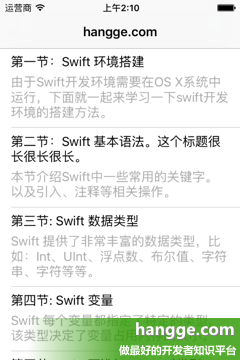
2,StoryBoard设置
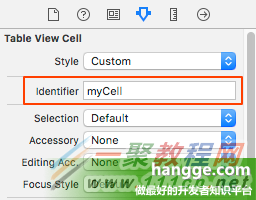
(1)将单元格 cell 的 identifier 设置成“myCell”
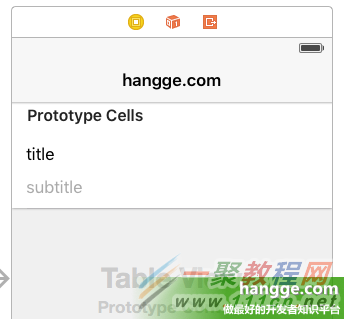
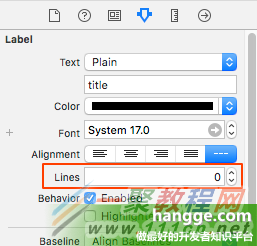
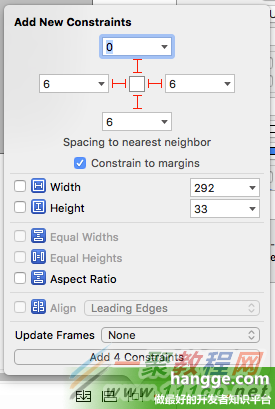
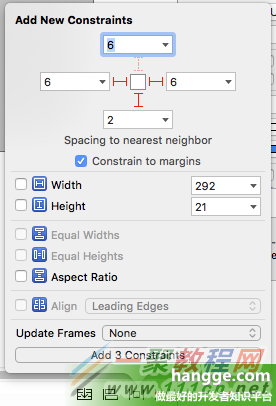
例子
import UIKit
class ViewController: UIViewController , UITableViewDelegate, UITableViewDataSource {
var catalog = [[String]]()
@IBOutlet weak var tableView: UITableView!
override func viewDidLoad() {
super.viewDidLoad()
//初始化列表数据
catalog.append(["第一节:Swift 环境搭建",
"由于Swift开发环境需要在OS X系统中运行,下面就一起来学习一下swift开发环境的搭建方法。"])
catalog.append(["第二节:Swift 基本语法。这个标题很长很长很长。",
"本节介绍Swift中一些常用的关键字。以及引入、注释等相关操作。"])
catalog.append(["第三节: Swift 数据类型",
"Swift 提供了非常丰富的数据类型,比如:Int、UInt、浮点数、布尔值、字符串、字符等等。"])
catalog.append(["第四节: Swift 变量",
"Swift 每个变量都指定了特定的类型,该类型决定了变量占用内存的大小。"])
catalog.append(["第五节: Swift 可选(Optionals)类型",
"Swift 的可选(Optional)类型,用于处理值缺失的情况。"])
//创建表视图
self.tableView.delegate = self
self.tableView.dataSource = self
//设置estimatedRowHeight属性默认值
self.tableView.estimatedRow.0;
//rowHeight属性设置为UITableViewAutomaticDimension
self.tableView.rowHeight = UITableViewAutomaticDimension;
}
//在本例中,只有一个分区
func numberOfSectionsInTableView(tableView: UITableView) -> Int {
return 1;
}
//返回表格行数(也就是返回控件数)
func tableView(tableView: UITableView, numberOfRowsInSection section: Int) -> Int {
return self.catalog.count
}
//创建各单元显示内容(创建参数indexPath指定的单元)
func tableView(tableView: UITableView, cellForRowAtIndexPath indexPath: NSIndexPath)
-> UITableViewCell
{
let cell = tableView.dequeueReusableCellWithIdentifier("myCell",
forIndexPath: indexPath) as UITableViewCell
//获取对应的条目内容
let entry = catalog[indexPath.row]
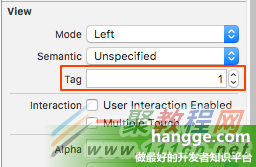
let titleLabel = cell.viewWithTag(1) as! UILabel
let subtitleLabel = cell.viewWithTag(2) as! UILabel
titleLabel.text = entry[0]
subtitleLabel.text = entry[1]
return cell
}
override func didReceiveMemoryWarning() {
super.didReceiveMemoryWarning()
}
}
相关文章
-
韩剧再婚皇后阿里云盘全集高清1080P资源链接-韩剧再婚皇后免费阿里云盘资源下载4K高清无删减版链接
游戏攻略 2026-11-06
-
poipiku网站如何打开-poipiku官网网页版访问入口
游戏攻略 2026-11-06
-
明日方舟:终末地-云游戏畅玩入口-明日方舟:终末地-网页版在线直连地址
游戏攻略 2026-11-06
-
poki在线小游戏网页版-poki免费游戏大全入口
游戏攻略 2026-11-06
-
poki游戏入口-点开即玩-poki游戏-在线免费畅玩
游戏攻略 2026-11-06
-
原神akt大佬资源viciNeko入口链接-原神akt大佬资源网页vicineko入口链接分享
游戏攻略 2026-11-06








