
iOS 只带底部框线的输入框例子
输入框一般有无边框(空白输入框),全边框(矩形输入框),加边框很简单,只需要设置UITextField的layer.borderColor属性和layer.borderWidth属性就可以了,如果要实现只带底部框线的输入框就不太好弄了,百度了一下找到了一个最笨也是挺不错的一个方法,那就是在下面直接给它加一条线就可以了。示例代码:
UITextField *passwordTextField = [[UITextField alloc] initWithFrame:CGRectMake(60, 120, 140, 23)];
passwordTextField.font = FONT(15);
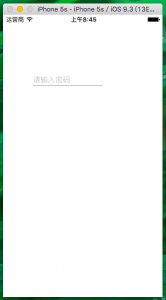
passwordTextField.placeholder = @"请输入密码";
[passwordTextField setSecureTextEntry:YES];
[self.view addSubview:passwordTextField];
UIView *lineView = [[UIView alloc]initWithFrame:CGRectMake(0,passwordTextField.height - 1, passwordTextField.width, 1)];
lineView.backgroundColor = [UIColor orangeColor];
[passwordTextField addSubview:lineView];
顺便附上效果图:
相关文章
-
韩剧再婚皇后阿里云盘全集高清1080P资源链接-韩剧再婚皇后免费阿里云盘资源下载4K高清无删减版链接
游戏攻略 2026-11-06
-
poipiku网站如何打开-poipiku官网网页版访问入口
游戏攻略 2026-11-06
-
明日方舟:终末地-云游戏畅玩入口-明日方舟:终末地-网页版在线直连地址
游戏攻略 2026-11-06
-
poki在线小游戏网页版-poki免费游戏大全入口
游戏攻略 2026-11-06
-
poki游戏入口-点开即玩-poki游戏-在线免费畅玩
游戏攻略 2026-11-06
-
原神akt大佬资源viciNeko入口链接-原神akt大佬资源网页vicineko入口链接分享
游戏攻略 2026-11-06








