使用PHP连接数据库实现留言板功能的实例讲解(推荐)
作者:袖梨
2022-06-24
PHP实现留言板功能:
1 首先是登录页面:
  留言板登录


  css/bootstrap.min.css" rel="external nofollow" rel="external nofollow" rel="external nofollow" rel="stylesheet" type="text/css"/>
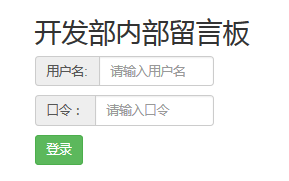
开发部内部留言板
用户名:
口令:
登录
2 登录页面完成后要进入登录处理页面了,也就是上面提交到的messloginchuli.php
<?php session_start();  // 登录之后要把所包含登录的页面连接起来,开启session
$uid = $_POST["uid"];
$pwd = $_POST["pwd"];
require_once "./DBDA.class.php";
$db = new DBDA();
$sql = "select password from yuangong where username='{$uid}'";
$arr = $db->query($sql,0);
//var_dump($arr[0][0]);
if($arr[0][0]=$pwd && !empty($pwd)){
 $_SESSION["uid"]=$uid;
 header("location:message.php");
}

?>
登录页面效果如图:
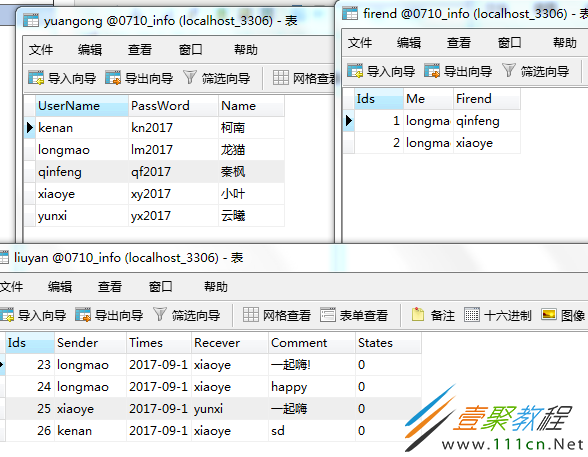
3.登录完成后是进入主页面,也就是显示自己收到的对话内容,下面是设计的数据库的表格和主页面的代码:
  <?php session_start();
  $uid = $_SESSION["uid"];
  if(empty($_SESSION["uid"])){
   header("location:messlogin.php");
   exit;
  }
  ?>
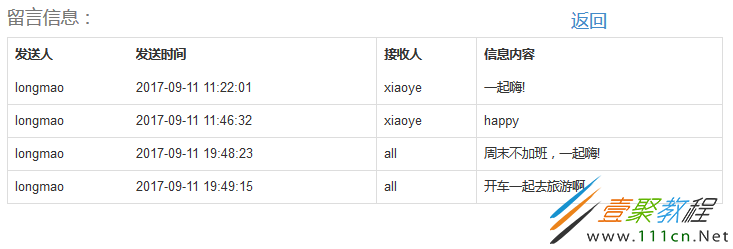
| 发送人 | 发送时间 | 接收人 | 信息内容 |
|---|---|---|---|
| {$v[1]} | {$v[2]} | {$v[3]} | {$v[4]} |
退出登录系统实现用户注销,返回登录页面功能代码如下:
 <?php session_start();
$uid = $_SESSION["uid"];
unset($uid);
header("location:messlogin.php");

?>
代码写到这里,比较重要的部分就完成了,下面是要进入发布信息页面了,相当于之前写的添加的页面,其处理页面也是和之前没什么区别的,差别在于现在的处理页面是在用户登录的情况下操作的,需要用session把所有的登录情况下的页面连接起来
主页面效果如图:

4.最后是信息发布页面,可以给任何人发送信息
代码如下:
  发布信息界面


<?php session_start();
$uid = $_SESSION["uid"];
if (empty($_SESSION["uid"])) {
 header("location:messlogin.php");
 exit ;
}
?>
接收人:
所有人
<?php require_once "./DBDA.class.php";
$db = new DBDA();
//这里可以给特定的朋友发送信息的sql语句
//$sql = "select firend.firend,yuangong.name from firend,yuangong where firend.firend
//= yuangong.username and firend.me = '{$uid}'";
$sname = "select * from yuangong where username not in ('{$uid}')";
$arr = $db->query($sname,0);
//var_dump($arr[0][2]);
foreach($arr as $v){
echo "{$v[2]}";
}
?>
信息内容:
发送
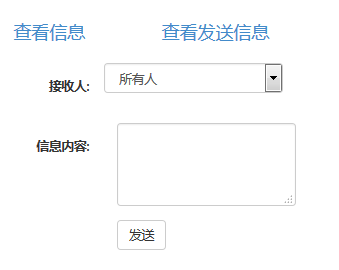
发信息页面如图:
5.发布信息完成后要进入处理页面了,也就是提交到的infochuli.php,最后返回发送信息界面
<?php session_start();
$uid = $_SESSION["uid"];
$recever = $_POST["recever"];
$content = $_POST["content"];
$arr = $_POST["recever"];
$t = date("Y-m-d H:i:s");
require_once "./DBDA.class.php";
$db = new DBDA();
$sql = "insert into liuyan values('','{$uid}','{$t}','{$recever}','{$content}',0)";
$arr = $db->query($sql);
if($arr && !empty($arr)){
 header("location:publish_info.php");
}else{
 echo "发送失败!";
}

?>
相关文章
-
Python工程实践之np.loadtxt()读取数据
游戏攻略 2026-09-25
-
python中的extend功能及用法
游戏攻略 2026-09-25
-
pythonJieba分词处理详解【模式词库的添加、删除自定义词库失败处理等】
游戏攻略 2026-09-25
-
pycharm没有找到manage repositories按钮的解决办法
游戏攻略 2026-09-25
-
Python+pandas数据分析实践总结
游戏攻略 2026-09-25
-
pycharm中报ModuleNotFoundErrorNo module named apostensorflowapos错误解决
游戏攻略 2026-09-25