
关于WPF WriteableBitmap类直接操作像素点的问题
作者:袖梨
2026-09-19
WPF是微软新一代图形系统,运行在.Nramework3.0及以上版本下,为用户界面、2D/3D图形、文档和媒体提供了统一的描述和操作方法,本文重点给大家介绍WPF WriteableBitmap类直接操作像素点的问题,感兴趣的朋友一起看看吧
WPF(Windows Presentation Foundation)是微软推出的基于Windows 的用户界面框架,属于.NET Framework 3.0的一部分。它提供了统一的编程模型、语言和框架,真正做到了分离界面设计人员与开发人员的工作;同时它提供了全新的多媒体交互用户图形界面。
还是话不多说,直接上码:
1.新建WpfApp应用程序
2.MainWindow.xaml文件代码如下:
<Window x:Class="WpfApp1.MainWindow"xmlns="http://schemas.micr*o**soft.com/winfx/2006/xaml/presentation"xmlns:x="http://schemas.**mi*crosoft.com/winfx/2006/xaml"xmlns:d="http://schemas.***microsoft.com/expression/blend/2008"xmlns:mc="http://schemas.openxml**for*mats.org/markup-compatibility/2006"xmlns:local="clr-namespace:WpfApp1"mc:Ignorable="d"Title="MainWindow" Height="450" Width="800"><Grid><Grid.RowDefinitions><RowDefinition Height="*"></RowDefinition><RowDefinition Height="10*" ></RowDefinition></Grid.RowDefinitions> <Button Name="button" Grid.Row="0" HorizontalAlignment="Center" Content="generate_bitmap" MinWidth="120"MinHeight="30" Click="Button_Click"></Button><Grid x:Name="imgGrid" Grid.Row="1"><Viewbox><Image x:Name="img"Width="{Binding RelativeSource={RelativeSource Self}, Path=Source.PixelWidth}" Height="{Binding RelativeSource={RelativeSource Self}, Path=Source.PixelHeight}"Source="{Binding CtrlImage, IsAsync=True}"Stretch="None" /></Viewbox></Grid></Grid></Window>
3.MainWindow.xaml.cs文件代码如下:
using System;using System.Collections.Generic;using System.Globalization;using System.Linq;using System.Text;using System.Windows;using System.Windows.Controls;using System.Windows.Data;using System.Windows.Documents;using System.Windows.Input;using System.Windows.Media;using System.Windows.Media.Imaging;using System.Windows.Navigation;using System.Windows.Shapes;using System.Drawing;using System.Drawing.Drawing2D; namespace WpfApp1{/// <summary>/// Interaction logic for MainWindow.xaml/// </summary>public partial class MainWindow : Window{public MainWindow(){InitializeComponent();}public void Button_Click(object sender, RoutedEventArgs e)WriteableBitmap wb = new WriteableBitmap((int)imgGrid.ActualWidth, (int)imgGrid.ActualHeight, 96, 96, PixelFormats.Pbgra32, null);wb.Lock();Bitmap backBitmap = new Bitmap((int)imgGrid.ActualWidth, (int)imgGrid.ActualHeight, wb.BackBufferStride, System.Drawing.Imaging.PixelFormat.Format32bppArgb, wb.BackBuffer);Int32Rect rect = new Int32Rect(0, 0, (int)imgGrid.ActualWidth, (int)imgGrid.ActualHeight);byte[] pixels = new byte[(int)imgGrid.ActualWidth * (int)imgGrid.ActualHeight * wb.Format.BitsPerPixel / 8];Random rand = new Random();for (int y = 0; y < wb.PixelHeight; y++){for (int x = 0; x < wb.PixelWidth; x++){int alpha = 0;int red = 0;int green = 0;int blue = 0;if ((x % 5 == 0) || (y % 7 == 0)){red = (int)((double)y / wb.PixelHeight * 255);green = rand.Next(100, 255);blue = (int)((double)x / wb.PixelWidth * 255);alpha = 255;}elsered = (int)((double)x / wb.PixelWidth * 255);blue = (int)((double)y / wb.PixelHeight * 255);alpha = 50;int pixeloffset = (x + y * wb.PixelWidth) * wb.Format.BitsPerPixel / 8;pixels[pixeloffset] = (byte)blue;pixels[pixeloffset + 1] = (byte)green;pixels[pixeloffset + 2] = (byte)red;pixels[pixeloffset + 3] = (byte)alpha;}int stride = (wb.PixelWidth * wb.Format.BitsPerPixel) / 8;wb.WritePixels(rect, pixels, stride, 0);}wb.Unlock();backBitmap.Dispose();backBitmap = null;img.Source = wb;}}
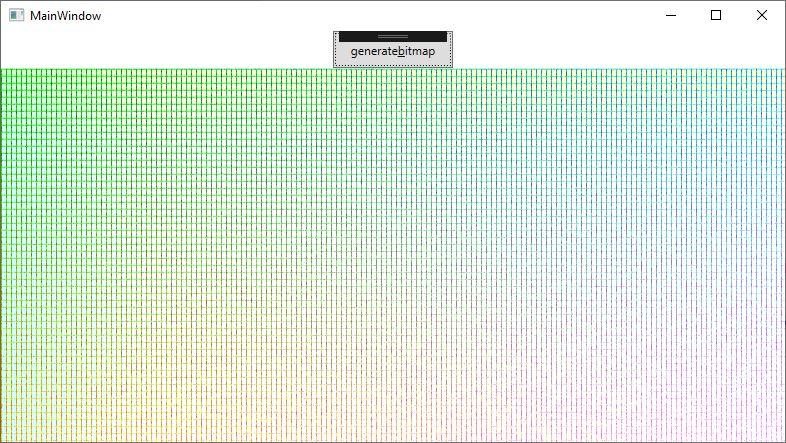
效果如下:
到此这篇关于C#中WPF WriteableBitmap类直接操作像素点的文章就介绍到这了,更多相关WPF WriteableBitmap类内容请搜索一聚教程网以前的文章或继续浏览下面的相关文章希望大家以后多多支持一聚教程网!
相关文章
-
WSL2+Docker+Ollama本地部署大模型思路和实践指南(Qwen1.8b)实用指南
游戏攻略 2026-10-17
-
DeepSeek Harness热门插件盘点:10个实用插件,覆盖多Agent、上下文和多模态实用指南
游戏攻略 2026-10-17
-
grep文本搜索与正则表达式完整代码示例实用指南
游戏攻略 2026-10-16
-
AI漫剧伪装直男1‑24集无雾版夸克网盘资源免费分享
游戏攻略 2026-10-15
-
AI漫剧玉僧入尘1-68集无雾无删版夸克网盘资源免费分享
游戏攻略 2026-10-15
-
AI漫剧拿握疯太子32集正片+4分钟专属小剧场夸克网盘资源分享
游戏攻略 2026-10-15








