Silverlight通过httpBinding访问IIS宿主WCF
作者:袖梨
2022-06-25
Silverlight通过httpBiding方式访问IIS宿主WCF是我们在Silverlight与WCF通信中最为常见的,也是用的最多的,我们用个很简单的例子进行演示。
项目结构:
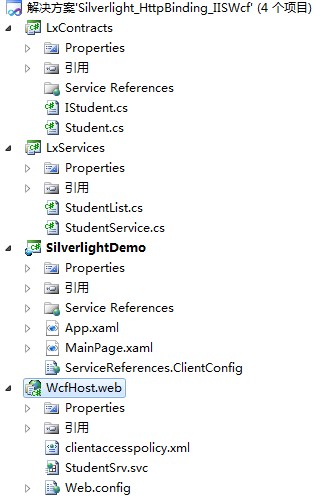
项目目结构简单说明:
| 程序集名称 | 需添加的引用 | 简要说明 |
| LxContracts | System.Runtime.Serialization System.ServiceModel | 用于存放操作契约与数据契约 |
| LxServices | LxContracts[项目] | 服务,操作契约的实现 |
| WcfHost.web | LxContracts[项目] 和LxServices[项目] | 利用Svc文件发布服务的站点 |
| SilverlightDemo | Silverlight程序,调用WCF服务 |
注意:建立Silverlight程序的时候,不需要承载网站,建立一个单一的Silverlight程序即可,这样做的原因是,把Silverlight和WCF服务不放到同一个站点下面,是为了演示跨域的问题。
代码实现:
类库LxContracts:(包括数据契约Student.cs和操作契约IStudent.cs)
Student.cs 代码
Student.cs 代码
| 代码如下 | 复制代码 |
using System; using System.Collections.Generic; using System.Linq; using System.Text; using System.ServiceModel; using System.Runtime.Serialization; namespace LxContracts { [DataContract] public class Student { /// /// 学生编号 /// [DataMember] public int StuId { get; set; } /// /// 学生姓名 /// [DataMember] public string StuName { get; set; } /// /// 所在班级 /// [DataMember] public string ClassName { get; set; } /// /// 联系电话 /// [DataMember] public string TelPhoneNum { get; set; } } } |
|
| 代码如下 | 复制代码 |
using System; using System.Collections.Generic; using System.Linq; using System.Text; using System.Runtime.Serialization; using System.ServiceModel; namespace LxContracts { [ServiceContract] public interface IStudent { [OperationContract] List GetStudent(); } } |
|
StudentList.cs
StudentService 代码
| 代码如下 | 复制代码 |
using System; using System.Collections.Generic; using System.Linq; using System.Text; using LxContracts; namespace LxServices { public class StudentList:List { public StudentList() { this.Add(new Student() { StuId = 1, StuName = "小明", ClassName = "计算机一班", TelPhoneNum = "123456" }); this.Add(new Student() { StuId = 2, StuName = "小红", ClassName = "计算机二班", TelPhoneNum = "234567" }); this.Add(new Student() { StuId = 2, StuName = "小兰", ClassName = "计算机三班", TelPhoneNum = "890123" }); } } } |
|
| 代码如下 | 复制代码 |
using System; using System.Collections.Generic; using System.Linq; using System.Text; using LxContracts; namespace LxServices { public class StudentService:IStudent { public List GetStudent() { //实际情况应该为从数据库读取 //本例手动生成一个StudentList StudentList ListStuent = new StudentList(); return ListStuent; } } } |
|
站点WcfHost.web,这是一个Asp.net 空web应用程序。
1、右击” WcfHost.web”—“添加”—“新建项”—“wcf服务”,命名为”StudentSrv.svc” 。如图:
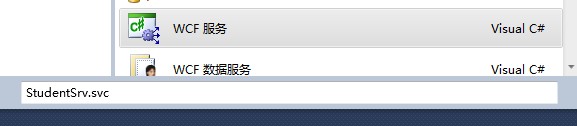
在项目中删除”StudentSrv.svc.cs”文件和”IStudentSrv.cs”文件。右击”StudentSrv.svc”文件,选择”查看标记”,将代码修改为:
2、修改webconfig 文件,代码如下:
WebConfig
注意:endpoint中的address 为空:因为svc文件的地址就是元数据发布的地址。
| 代码如下 | 复制代码 |
<?xml version="1.0" encoding="utf-8"?>


    aspNetCompatibilityEnabled="false"/>
|
|
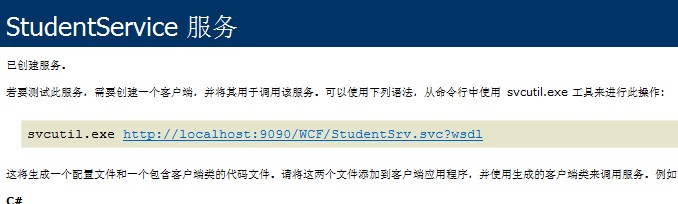
3、右击”StudentSrv.svc”文件,在”浏览器中查看”,显示如下图,说明服务已经部署好了,我用的端口是 9090:
在Silverlight中进行调用:
Silverlight调用wcf很简单,直接在”SilverlightDemo”中添加”服务引用即可”,Silverlight项目中会自动生成” ServiceReferences.ClientConfig”配置文件,当然也可以利用代码的方式调用,但是我比较懒 :)。
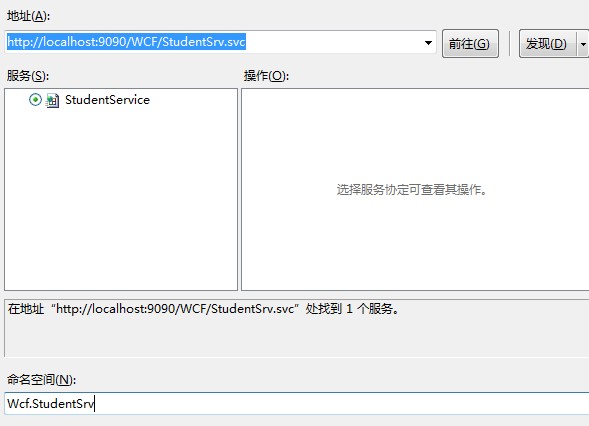
1、为Silverlight程序添加WCF:
“右击”—“SiverlightDemo”—“添加服务引用”—“输入服务地址”(我的是http://*loc*alhost*:9090/WCF/StudentSrv.svc)--点击“前往”,就会找到服务,命名为“WCF.StudentSrv”后,点击“确定”
2、在Silverlight中调用WCF:
MainPage.xaml中添加”DataGrid”控件,xaml代码如下:
MainPage.xaml 代码
MainPage.cs 代码
| 代码如下 | 复制代码 |
|
|
| 代码如下 | 复制代码 |
public partial class MainPage : UserControl { ObservableCollection listStudent; public MainPage() { InitializeComponent(); listStudent = new ObservableCollection(); this.Loaded += new RoutedEventHandler(MainPage_Loaded); } void MainPage_Loaded(object sender, RoutedEventArgs e) { StudentClient proxyClient = new StudentClient(); proxyClient.GetStudentAsync(); proxyClient.GetStudentCompleted += new EventHandler(proxyClient_GetStudentCompleted); } void proxyClient_GetStudentCompleted(object sender, GetStudentCompletedEventArgs e) { if (e.Error == null) { listStudent = e.Result; this.dgStudnet.ItemsSource = listStudent; } } } |
|
将” SilverlightDemo”设置为启动项目,运行,会产生下面的异常:

这就是因为当时建立项目的时候没有把Silverlight程序和WCF服务放到同一个站点的缘故,因此需要在发布WCF的网站根目录放置一个跨域文件:clientaccesspolicy.xml

 clientaccesspolicy.xml
<?xml version="1.0" encoding="utf-8"?>


      request-headers="SOAPAction">
再次运行,结果如下图所示:
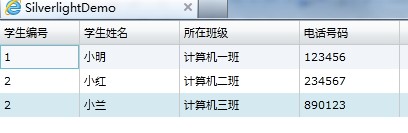
至此,Silverlight通过httbBingding方式访问IIS宿主的WCF的演示我们就进行到这里