技术专题:LangChain4j 开发Java Agent智能体 - 整合SpringBoot4
LangChain4j是构建Java AI应用的关键框架,本教程聚焦其日志配置与SpringBoot集成,从基础到实战帮助开发者快速上手智能体开发。
本课程全面覆盖LangChain4j核心知识:简介、阿里云百炼大模型接入、Ollama安装与使用、HelloWorld实现、日志配置、SpringBoot集成、Ai Service、对话与提示词工程、结构化输出、会话记忆、Function Calling、嵌入模型与向量数据库、RAG、MCP、多模态等,并配套视频教程助力学习。
SLF4J日志配置
LangChain4j采用SLF4J作为日志门面,支持接入Logback、Log4j等任意后端实现(SLF4J类似JDBC规范,具体实现由厂商或开源组织负责)。

此前运行代码时出现警告,提示未找到SLF4J提供者,可通过在pom.xml中添加Logback依赖解决:
<dependency>
  <groupId>ch.qos.logbackgroupId>
  <artifactId>logback-classicartifactId>
  <version>1.5.8version>
dependency>
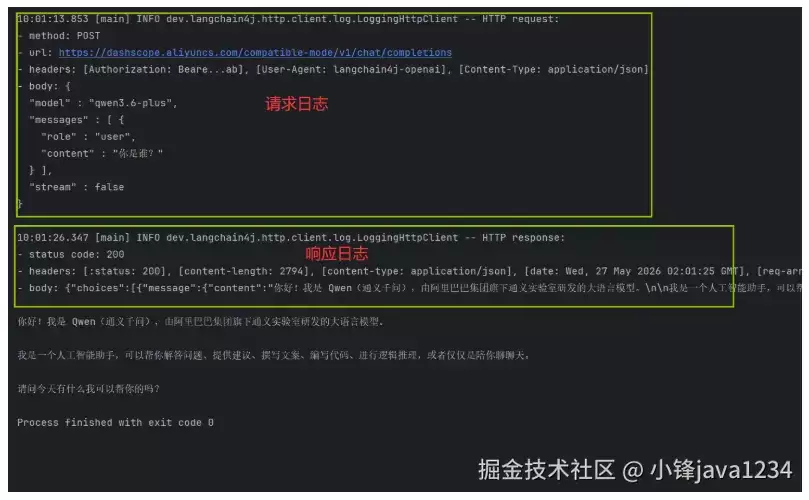
在创建模型实例时,通过设置.logRequests(true)和.logResponses(true)即可启用LLM请求与响应的日志记录:
package com.java1234;

import dev.langchain4j.model.openai.OpenAiChatModel;

/**
 * Hello world!
 */
public class App {
    public static void main(String[] args) {
        // 创建模型
        OpenAiChatModel model = OpenAiChatModel.builder()
                .logRequests(true) // 打印请求日志
                .logResponses(true) // 打印响应日志
                .baseUrl("https://dashscope.aliyuncs.com/compatible-mode/v1") // 模型地址
                .modelName("qwen3.6-plus") // 模型名称
                .apiKey(System.getenv("OPENAI_API_KEY")) // 密钥
                .build(); // 构建模型

        String answer = model.chat("你是谁?"); // 提问
        System.out.println(answer);
    }
}
运行输出:
整合SpringBoot4(使用百炼云平台接口)
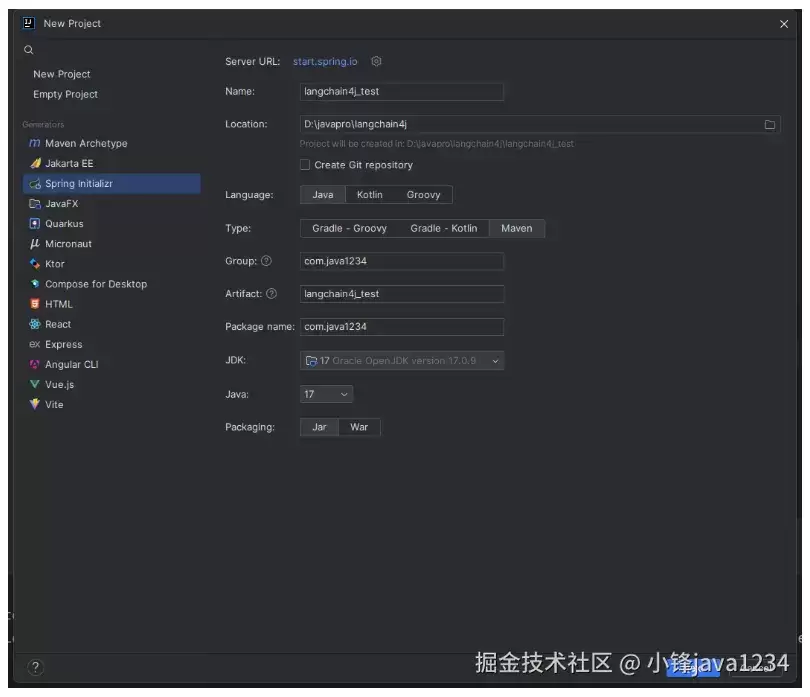
将LangChain4j整合到SpringBoot4中,首先新建项目langchain4j_test,选择Maven构建,JDK版本选17:
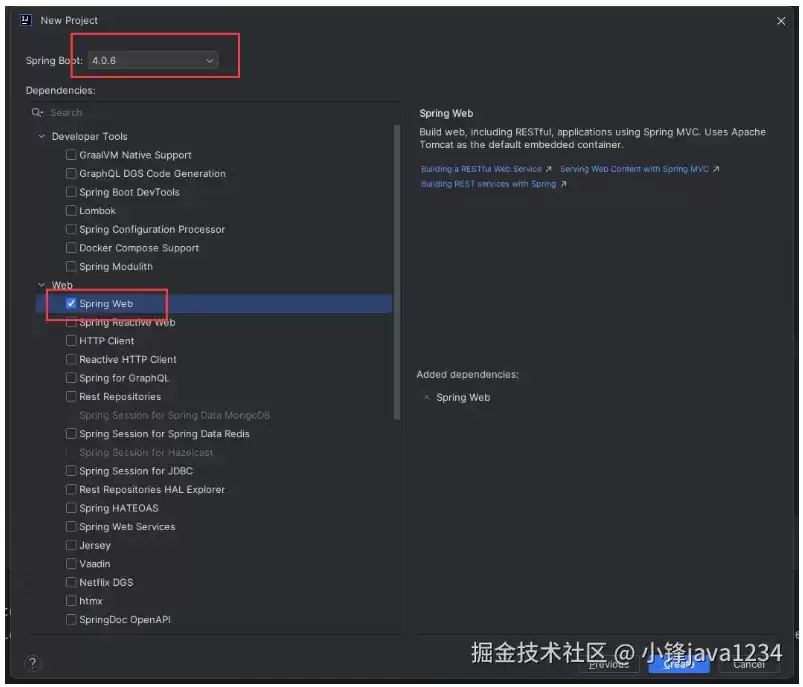
点击Next,选择SpringBoot版本4.0.6并添加Spring Web依赖:
依据官方文档,在pom.xml中添加LangChain4j依赖:
<dependency>
  <groupId>dev.langchain4jgroupId>
  <artifactId>langchain4j-open-ai-spring-boot4-starterartifactId>
  <version>1.15.0-beta25version>
dependency>
在application.yml中配置模型参数、日志及日志级别:
langchain4j:
  open-ai:
    chat-model:
      api-key: ${OPENAI_API_KEY}
      model-name: qwen3.6-plus
      base-url:
      temperature: 0.7 # 控制LLM生成文本随机性/创造性,值越高越随机,范围0-1
      log-requests: true
      log-responses: true

logging:
  level:
    dev.langchain4j: debug
新建MyChatController进行测试:
package com.java1234.controller;

import dev.langchain4j.model.openai.OpenAiChatModel;
import org.springframework.beans.factory.annotation.Autowired;
import org.springframework.web.bind.annotation.RequestMapping;
import org.springframework.web.bind.annotation.RestController;

@RestController
public class MyChatController {

    @Autowired
    private OpenAiChatModel chatModel;

    @RequestMapping("/chat")
    public String chat(String question) {
        return chatModel.chat(question);
    }

}
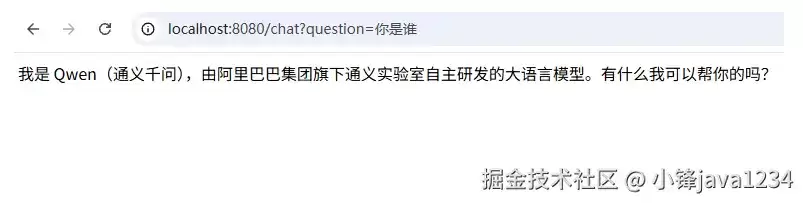
启动项目,浏览器输入测试:你是谁?,返回结果:
整合SpringBoot4(使用Ollama)
LangChain4j针对Ollama提供了专用库,在pom.xml中添加:
<dependency>
  <groupId>dev.langchain4jgroupId>
  <artifactId>langchain4j-ollama-spring-boot4-starterartifactId>
  <version>1.15.0-beta25version>
dependency>
application.yml中配置Ollama模型参数:
langchain4j:
  ollama:
    chat-model:
      model-name: qwen3:4b
      base-url:
      temperature: 0.7
      log-requests: true
      log-responses: true
  open-ai:
    chat-model:
      api-key: ${OPENAI_API_KEY}
      model-name: qwen3.6-plus
      base-url:
      temperature: 0.7
      log-requests: true
      log-responses: true

logging:
  level:
    dev.langchain4j: debug
在MyChatController中注入OllamaChatModel并添加chat2方法:
package com.java1234.controller;

import dev.langchain4j.model.ollama.OllamaChatModel;
import dev.langchain4j.model.openai.OpenAiChatModel;
import org.springframework.beans.factory.annotation.Autowired;
import org.springframework.web.bind.annotation.RequestMapping;
import org.springframework.web.bind.annotation.RestController;

@RestController
public class MyChatController {

    @Autowired
    private OpenAiChatModel chatModel;

    @Autowired
    private OllamaChatModel ollamaChatModel;

    @RequestMapping("/chat")
    public String chat(String question) {
        return chatModel.chat(question);
    }

    @RequestMapping("/chat2")
    public String chat2(String question) {
        return ollamaChatModel.chat(question);
    }

}
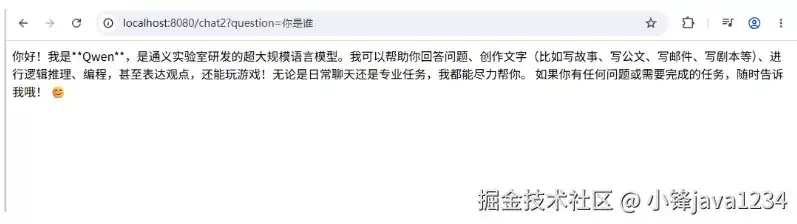
启动项目,浏览器输入测试:你是谁?,结果:
上述配置完整演示了LangChain4j在SLF4J日志、百炼云平台及Ollama本地模型下的集成流程,为Java开发者构建智能体应用提供了清晰可行的实践参考。