
Windows IIS 7.5伪静态中文URL地址404错误问题
空间迁移后,WordPress文章中所有的中文tag页面访问全都报404错误,Google搜索了一下,得知IIS7.5伪静态URL_Rewrite不支持中文,最终在IIS7 WordPress 中文 URL 解决方案博文中找到解决方法,特别感谢原文作者,在此将解决方案再分享一下,希望可以帮到后来的朋友~
在WordPress安装目录下,新建一个“chineseurl.php”文件,内容如下:
| 代码如下 | 复制代码 |
|
<?php // IIS Mod-Rewrite // Some IIS + PHP configurations puts the script-name in the path-info (No need to append it twice) // Append the query string if it exists and isn't null require("index.php"); ?> |
|
然后在web.config中新增一条规则,并将此规则置于规则集合的顶部:
| 代码如下 | 复制代码 |
|
|
|
效果如下
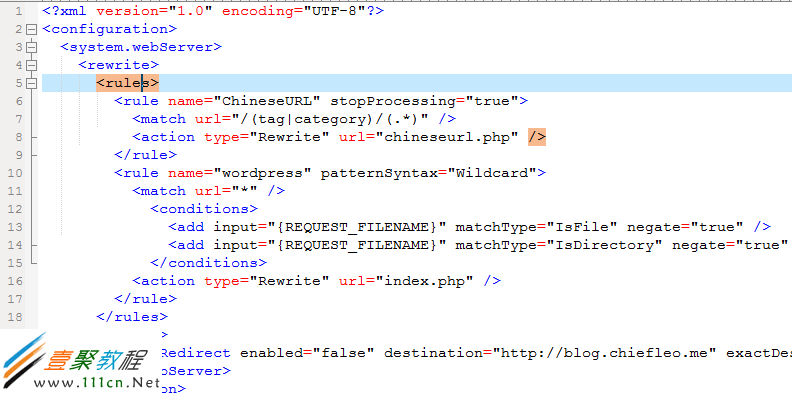
如果 WordPress 不是装在根目录,则需要更改“”为“”。如果在固定链接设置里把默认的标签前缀和分类目录前缀(tag 和 category)改了,则更改这句里的对应内容即可。
相关文章
-
韩剧再婚皇后阿里云盘全集高清1080P资源链接-韩剧再婚皇后免费阿里云盘资源下载4K高清无删减版链接
游戏攻略 2026-11-06
-
poipiku网站如何打开-poipiku官网网页版访问入口
游戏攻略 2026-11-06
-
明日方舟:终末地-云游戏畅玩入口-明日方舟:终末地-网页版在线直连地址
游戏攻略 2026-11-06
-
poki在线小游戏网页版-poki免费游戏大全入口
游戏攻略 2026-11-06
-
poki游戏入口-点开即玩-poki游戏-在线免费畅玩
游戏攻略 2026-11-06
-
原神akt大佬资源viciNeko入口链接-原神akt大佬资源网页vicineko入口链接分享
游戏攻略 2026-11-06








