SpringJDBC与KingbaseES深度集成:构建高性能国产数据库应用实践
引言
在数字化转型的浪潮中,国产数据库正以前所未有的速度崛起。作为其中的佼佼者,KingbaseES凭借其自主可控、高性能、高可用的特性,在政务、金融、能源等关键领域大放异彩。而Spring JDBC框架作为Java生态中久经考验的数据访问利器,其简洁的设计和强大的功能,使其成为连接KingbaseES的理想选择。本文将探索Spring JDBC与KingbaseES的集成,构建高性能的国产数据库应用
一、为什么选择Spring JDBC + KingbaseES?
1.1 国产数据库的崛起
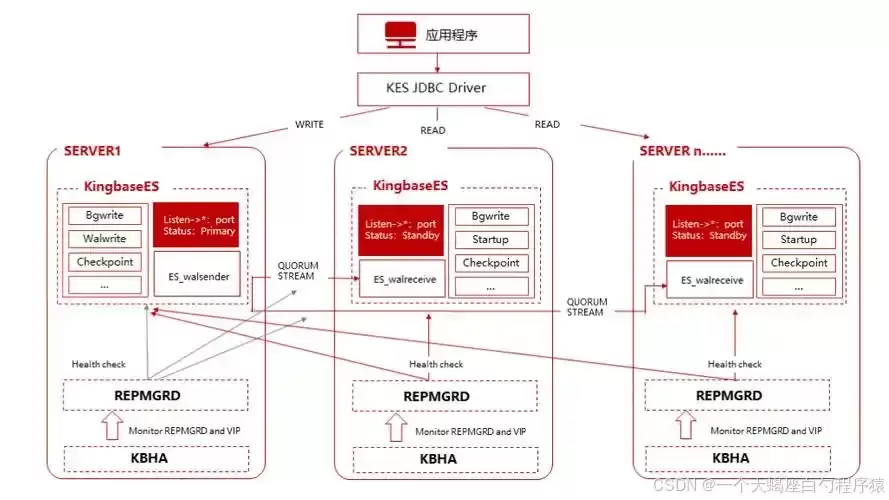
KingbaseES作为金仓推出的企业级数据库,不仅兼容SQL标准,更在性能优化、高可用性、安全合规等方面展现出独特优势。其MySQL兼容版更是在易用性上迈出重要一步
1.2 Spring JDBC的核心价值
Spring JDBC作为Spring框架的核心组件之一,通过JdbcTemplate等工具类封装了JDBC的冗长操作,提供了更简洁、更安全的数据库访问方式。其特点包括:
- 模板化设计:通过回调机制减少重复代码
- 异常转换:将JDBC异常转换为Spring统一的数据访问异常体系
- 事务管理:无缝集成Spring事务管理器
- 连接池优化:支持多种连接池(如HikariCP、Druid)
二、环境搭建
2.1 环境准备
- 安装 Kingbase 数据库
- 安装 JDK 1.8
- 安装 Maven
- 安装 IDEA 工具
点击下载:spring-jdbc-kingbase-client
2.2 spring-jdbc-kingbase-client 项目导入到 IDEA
操作步骤:
- 打开 IDEA,在菜单栏上选择 File->Open。在弹出的对话框中,点击 Directory 按钮选择项目所在的spring-jdbc-kingbase-client 目录,然后点击确定完成导入
- IntelliJ IDEA 将会自动识别项目中的各类文件,并在 Project 工具窗口中,可以查看项目的目录结构、文件列表、模块列表、依赖关系等信息。Project 工具窗口通常位于 IntelliJ IDEA 界面的最左侧,默认情况下是打开的。如果 Project 工具窗口被关闭了,可以通过点击菜单栏中的 View > Tool Windows > Project 或者使用快捷键 Alt + 1 来重新打开
- 根据已部署的Kingbase数据库填写下面的URL的对应信息
2.3 获取 KingBase数据库 URL
- 找 Kingbase数据库部署人员获取相应的数据库连接串
例如:
./ksql -U system -d test -h xx.xx.xx.xx -p 54321
根据 Kingbase数据库连接串信息填写下面 URL 的对应信息
jdbc:kingbase8://$host:$port/$database_name?user=$user_name&password=$password
参数说明:
$host :提供 Kingbase数据库连接 IP。
$port :提供 Kingbase数据库连接端口。默认是54321 ,在部署 Kingbase数据库时可自定义端口号。
$database_name:需要访问的 database名称。
需注意:
连接租户的用户需要拥有该 database的 CREATE TABLE 、DROP TABLE 、 INSERT 、 DELETE 、 UPDATE 和 SELECT 权限
2.4 : 修改 spring-jdbc-kingbase-client项目中的数据库连接信息
获取 Kingbase数据库 URL 中获取的信息修改文件 spring-jdbc-kingbase-client/src/main/java/com/example/Main.java 中的数据库连接信息
例如:
// Database Connect Information
String url = "jdbc:kingbase8://192.168.xx.xxx:7901/test";
String username = "root";
String password = "123456";
2.5 运行 spring-jdbc-kingbase-client 项目
运行的步骤博主统计并列出来了,小伙伴可以跟着操作
- 在项目结构中找到 src/main/java/com/example/中找到 Main.java 文件
- 在工具菜单栏中选择 运行(U) > 运行 > Main,或直接单击右上角绿色三角形运行
- 通过 IDEA 的控制台来查看项目的日志信息和输出结果
三、基础操作实战:从建表到数据操作
3.1 创建数据库表
DDL语句示例:
CREATE TABLE employees (
    id SERIAL PRIMARY KEY,
    name VARCHAR(100) NOT NULL,
    department VARCHAR(50),
    salary NUMERIC(10,2),
    hire_date DATE DEFAULT CURRENT_DATE
);
Java执行代码:
import org.springframework.jdbc.core.JdbcTemplate;
import org.springframework.beans.factory.annotation.Autowired;
import org.springframework.stereotype.Repository;
@Repository
public class EmployeeRepository {
    private final JdbcTemplate jdbcTemplate;
    @Autowired
    public EmployeeRepository(JdbcTemplate jdbcTemplate) {
        this.jdbcTemplate = jdbcTemplate;
    }
    public void createTable() {
        jdbcTemplate.execute("""
            CREATE TABLE employees (
                id SERIAL PRIMARY KEY,
                name VARCHAR(100) NOT NULL,
                department VARCHAR(50),
                salary NUMERIC(10,2),
                hire_date DATE DEFAULT CURRENT_DATE
            )
        """);
    }
}
3.2 插入数据操作
单条插入示例:
public void insertEmployee(Employee employee) {
    jdbcTemplate.update("""
        INSERT INTO employees (name, department, salary, hire_date)
        VALUES (?, ?, ?, ?)
    """, employee.getName(), employee.getDepartment(),
        employee.getSalary(), employee.getHireDate());
}
批量插入优化:
public void batchInsert(List<Employee> employees) {
    jdbcTemplate.batchUpdate("""
        INSERT INTO employees (name, department, salary, hire_date)
        VALUES (?, ?, ?, ?)
    """, new BatchPreparedStatementSetter() {
        @Override
        public void setValues(PreparedStatement ps, int i) throws SQLException {
            Employee e = employees.get(i);
            ps.setString(1, e.getName());
            ps.setString(2, e.getDepartment());
            ps.setBigDecimal(3, e.getSalary());
            ps.setDate(4, new Date(e.getHireDate().getTime()));
        }
        @Override
        public int getBatchSize() {
            return employees.size();
        }
    });
}
3.3 查询数据操作
基础查询:
public List<Employee> findAll() {
    return jdbcTemplate.query("""
        SELECT id, name, department, salary, hire_date
        FROM employees
    """, (rs, rowNum) -> new Employee(
        rs.getLong("id"),
        rs.getString("name"),
        rs.getString("department"),
        rs.getBigDecimal("salary"),
        rs.getDate("hire_date")
    ));
}
条件查询:
public List<Employee> findByDepartment(String department) {
    return jdbcTemplate.query("""
        SELECT * FROM employees
        WHERE department = ?
        ORDER BY salary DESC
    """, new Object[]{department}, new BeanPropertyRowMapper<>(Employee.class));
}
3.4 更新与删除操作
更新操作:
public void updateSalary(Long id, BigDecimal newSalary) {
    jdbcTemplate.update("""
        UPDATE employees
        SET salary = ?
        WHERE id = ?
    """, newSalary, id);
}
删除操作:
public void deleteEmployee(Long id) {
    jdbcTemplate.update("""
        DELETE FROM employees
        WHERE id = ?
    """, id);
}
3.5 删除表操作
public void dropTable() {
    jdbcTemplate.execute("DROP TABLE IF EXISTS employees");
}
四、事务管理:保障数据一致性
4.1 声明式事务管理
配置事务管理器:
import org.springframework.context.annotation.Bean;
import org.springframework.context.annotation.Configuration;
import org.springframework.jdbc.datasource.DataSourceTransactionManager;
import org.springframework.transaction.PlatformTransactionManager;
import javax.sql.DataSource;
@Configuration
public class TransactionConfig {
    @Bean
    public PlatformTransactionManager transactionManager(DataSource dataSource) {
        return new DataSourceTransactionManager(dataSource);
    }
}
服务层事务管理:
import org.springframework.transaction.annotation.Transactional;
import org.springframework.stereotype.Service;
@Service
public class EmployeeService {
    private final EmployeeRepository employeeRepository;
    public EmployeeService(EmployeeRepository employeeRepository) {
        this.employeeRepository = employeeRepository;
    }
    @Transactional
    public void transferDepartment(Long employeeId, String newDept) {
        // 更新部门操作
        employeeRepository.updateDepartment(employeeId, newDept);
        // 记录变更日志(需在同一事务中)
        employeeRepository.logDepartmentChange(employeeId, newDept);
    }
}
4.2 事务传播行为与隔离级别
@Transactional(
    propagation = Propagation.REQUIRED,
    isolation = Isolation.READ_COMMITTED,
    timeout = 30,
    rollbackFor = {SQLException.class, RuntimeException.class}
)
public void complexOperation() {
    // 业务逻辑
}
五、异常处理与日志监控
5.1 统一异常处理
全局异常处理器:
import org.springframework.dao.DataAccessException;
import org.springframework.http.HttpStatus;
import org.springframework.http.ResponseEntity;
import org.springframework.web.bind.annotation.ControllerAdvice;
import org.springframework.web.bind.annotation.ExceptionHandler;
@ControllerAdvice
public class GlobalExceptionHandler {
    @ExceptionHandler(DataAccessException.class)
    public ResponseEntity<ErrorResponse> handleDataAccessException(DataAccessException ex) {
        ErrorResponse error = new ErrorResponse(
            "DATABASE_ERROR",
            ex.getMessage(),
            LocalDateTime.now()
        );
        return ResponseEntity.status(HttpStatus.INTERNAL_SERVER_ERROR)
                             .body(error);
    }
}
5.2 SQL日志监控
配置SQL日志:
logging:
  level:
    org.springframework.jdbc.core.JdbcTemplate: DEBUG
    org.springframework.jdbc.core.StatementCreatorUtils: TRACE
自定义日志格式:
import org.apache.logging.log4j.LogManager;
import org.apache.logging.log4j.Logger;
public class JdbcLogger {
    private static final Logger logger = LogManager.getLogger();
    public static void logSql(String sql, Object... params) {
        logger.debug("Executing SQL: {} with parameters: {}", sql, params);
    }
}
六、性能优化
6.1 预编译语句优化
// 使用参数化查询防止SQL注入
public List<Employee> findByNamePattern(String namePattern) {
    return jdbcTemplate.query("""
        SELECT * FROM employees
        WHERE name LIKE ?
        ESCAPE ''
    """, new Object[]{namePattern + "%"},
        new BeanPropertyRowMapper<>(Employee.class));
}
6.2 批量操作性能调优
批量插入性能对比:
| 操作类型 | 1000条记录耗时 | 10000条记录耗时 |
|---|---|---|
| 单条插入 | 1200ms | 12000ms |
| 批量插入 | 80ms | 650ms |
优化技巧:
- 使用rewriteBatchedStatements=true
- 调整连接池大小
- 启用JDBC批量处理
七、高级特性
7.1 存储过程调用
KingbaseES存储过程示例:
CREATE OR REPLACE PROCEDURE raise_salary(
    IN emp_id BIGINT,
    IN percent NUMERIC
)
LANGUAGE plpgsql
AS $$
BEGIN
    UPDATE employees
    SET salary = salary * (1 + percent/100)
    WHERE id = emp_id;
END;
$$;
Java调用代码:
public void callRaiseSalary(Long empId, BigDecimal percent) {
    jdbcTemplate.execute("""
        CALL raise_salary(?, ?)
    """, empId, percent);
}
7.2 分页查询优化
物理分页实现:
public Page<Employee> findPaginated(int page, int size) {
    int offset = (page - 1) * size;
    List<Employee> employees = jdbcTemplate.query("""
        SELECT * FROM employees
        ORDER BY salary DESC
        LIMIT ? OFFSET ?
    """, new Object[]{size, offset},
        new BeanPropertyRowMapper<>(Employee.class));
    long total = jdbcTemplate.queryForObject("SELECT COUNT(*) FROM employees", Long.class);
    return new PageImpl<>(employees, Pageable.ofSize(size).withPage(page), total);
}
7.3 国产数据库特性
KingbaseES特有函数:
-- 日期处理
SELECT to_char(hire_date, 'YYYY-MM-DD') FROM employees;
-- JSON处理
SELECT json_object('name': name, 'dept': department)
FROM employees;
-- 全文检索
SELECT * FROM employees
WHERE to_tsvector('zh', name) @@ to_tsquery('zh', '张三');
7.4 性能优化
- 创建索引优化查询
CREATE INDEX idx_employee_salary ON employees(salary);
- 强制索引使用
SELECT /*+ INDEX(employees idx_employee_salary) */ *
FROM employees
WHERE salary > 5000;
八、避坑指南
连接问题:
- 连接超时:检查防火墙设置、端口开放情况
- 认证失败:验证用户名密码、数据库权限配置
- 驱动不匹配:确认JDBC驱动版本与数据库版本兼容
测试数据库连接
telnet localhost 54321
检查连接池状态
http://localhost:8080/actuator/hikari
九、总结
本文详细介绍如何使用 Spring JDBC框架和 kingbase 数据库构建一个应用程序,实现创建表、插入数据、查询数据,更新数据、删除数据和删除表等基本操作。有任何问题可联系博主解决,后面博主将带着伙伴们探索更多 “知识”。
- 事务管理:优先使用声明式事务,注意事务传播行为
- 异常处理:统一异常处理,区分技术异常和业务异常
- 性能优化:善用预编译语句、批量操作、索引优化
未来,随着云计算、大数据技术的发展,KingbaseES正在向云原生、分布式架构演进。Spring框架也在不断进化