日志服务数据加工:快速开始 - SLB日志加工实战

背景
这里我们拿一个Logstore中的网关数据(阿里云SLB日志)举例,对其数据进行加工并分发到不同的Logstore中。
数据
源logstore(slb-log)的数据内容是一个阿里云SLB的网络日志,格式样例如下:
__source__:log_service__tag__:__receive_time__:1559799897__topic__:body_bytes_sent:740client_ip:1.2.3.4host:m.abcd.comhttp_host:m.abcd.comhttp_referer:-http_x_forwarded_for:-http_x_real_ip:-read_request_time:0request_length:0request_method:GETrequest_time:0.000request_uri:/category/abc/product_id?id=75&type=2&sam=123scheme:httpsserver_protocol:HTTP/2.0slb_vport:443slbid:lb-1234ssl_cipher:ECDHE-RSA-AES128-GCM-SHA256ssl_protocol:TLSv1.2status:200tcpinfo_rtt:58775time:2019-06-06T13:44:50 08:00upstream_addr:1.2.3.4:80upstream_response_time:4.1234upstream_status:200vip_addr:1.2.3.4write_response_time: 4.1234
目标
这里我们希望对数据进行如下加工,获取三份数据:
分发
将所有status非2XX或者3XX的请求,复制一份到目标logstore:slb-log-error中,日志时间180天,以便进一步做研发与安全类分析,__topic__设置为slb_error将所有不那么重要的图片或静态资源的请求日志,分发到目标logstore: slb-log-media,日志保存30天, topic设置为slb_media_request其他的请求日志,用于进一步分析统计业务对接的,分发到目标logstore: slb-log-normal,日志保存90天,topic设置为slb_normal 转换
对slb_media_request的请求 提取如下字段 object_file=app.iconobject_type = icon # css, jpeg, js 等 保留如下字段:
http_referer:-body_bytes_sent:740client_ip:1.2.3.4host:m.abcd.comrequest_time:4.33 slb_normal请求 保留如下字段
body_bytes_sent:740client_ip:1.2.3.4host:m.abcd.comhttp_referer:-http_x_real_ip:-request_length:0request_method:GETrequest_time:4.33request_uri:/category/abc/product_id?id=75&type=2&sam=123scheme:httpsslb_vport:443slbid:lb-1234status:200time:2019-06-06T13:44:50 08:00 提取request_uri的参数加上前缀reqparam_
reqparam_id: 75reqparam_type: 2reqparam_sam: 123 http_x_real_ip如果为空或者-时,填上client_ip的值提取host中的domain值:
domain:abcd
准备工作
目标logstore准备
创建好如下3个logstoreslb-log-normal# 日志保存90天,逻辑命名定为target0slb-log-error# 日志保存180天,逻辑命名定为target1slb-log-media# 日志保存30天, 逻辑命名定为target2 并各自配置好索引
点击每个logstore的【查询】页面的【索引】设置,并根据每个logstore存储的日志的字段,配置相应的索引。也可以使用CloudShell中的CLI的copy_logstore子命令来从源logstore复制一份索引到目标,再进行调整来简化操作。
权限秘钥准备
当前操作需要授权以便读取源logstore或写入目标logstore
通过AK秘钥授权通过角色授权(二期会支持)需要准备好一个或多个(每个logstore对应一个)AK秘钥访问:
源logstore的最小RAM授权
{"Version": "1","Statement": [{"Action": ["log:ListShards","log:GetCursorOrData","log:GetConsumerGroupCheckPoint","log:UpdateConsumerGroup","log:ConsumerGroupHeartBeat","log:ConsumerGroupUpdateCheckPoint","log:ListConsumerGroup","log:CreateConsumerGroup"],"Resource": ["acs:log:*:*:project/源project/logstore/slb-log","acs:log:*:*:project/源project/logstore/slb-log/*"],"Effect": "Allow"}]}
目标logstore的最小RAM授权
{"Statement": [{"Action": ["log:Post*"],"Effect": "Allow","Resource": [ "acs:log:*:*:project/目标Project/logstore/slb-log-error", "acs:log:*:*:project/目标Project/logstore/slb-log-media", "acs:log:*:*:project/目标Project/logstore/slb-log-normal"]}],"Version": "1"}
也可以考虑将这两个授权合并成一个以便简化操作。
配置加工任务
进入加工规则界面
在日志服务列表中,选择源logstore(slb-log)的数据接入右边的 号直接进入加工模式.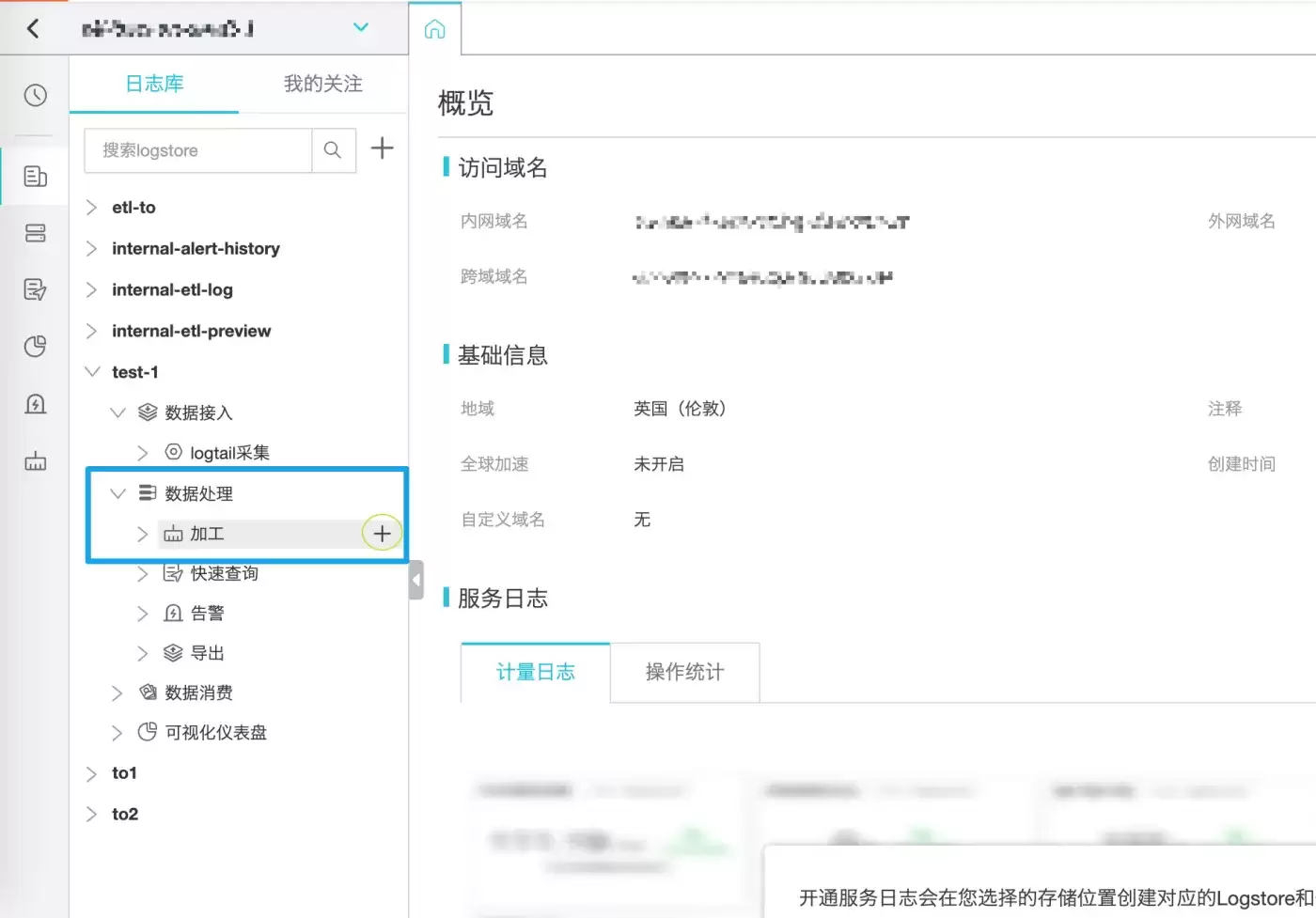
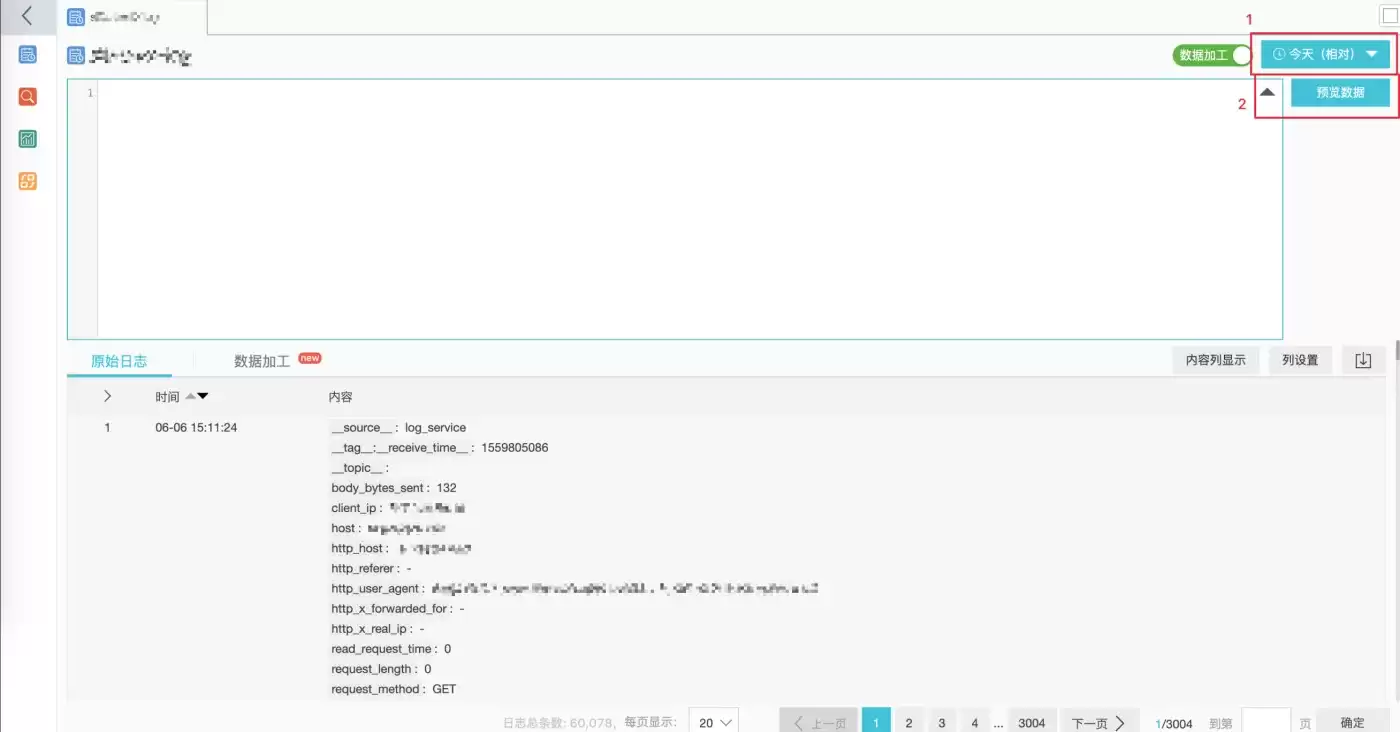
在 #1 中选择日期的时间,例如【今天】,确保能够看到数据:
复制失败的请求日志到sbl-log-error
在编辑框中输入如下的规则(关于语法说明,可参考后续的章节):
e_if(e_match("status", r"4d |5d "), e_coutput("target1", topic="slb_error"))e_drop()
再点击【预览数据】,会弹窗提示输入访问源logstore的AK秘钥,输入前面准备好的AK秘钥: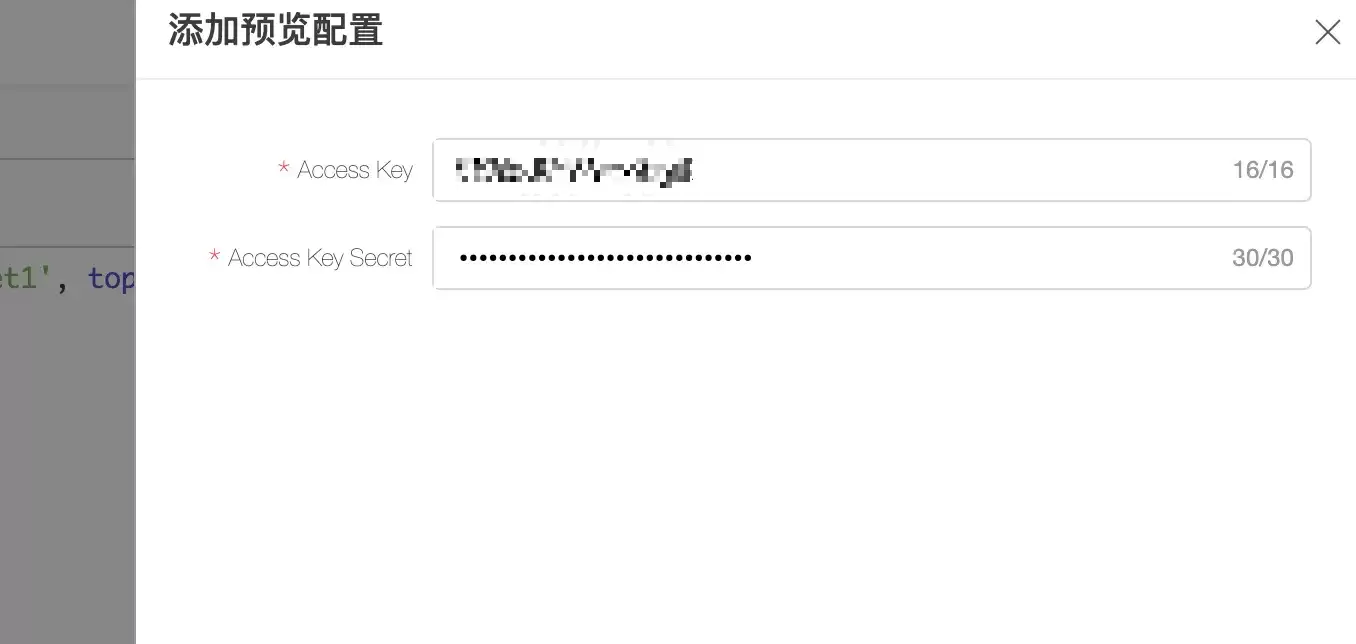
等待一会儿之后,可以在【数据加工】标签页中看到结果中,所有非2XX/3XX的请求会被输出到target1的目标中,且topic设置为了slb_error: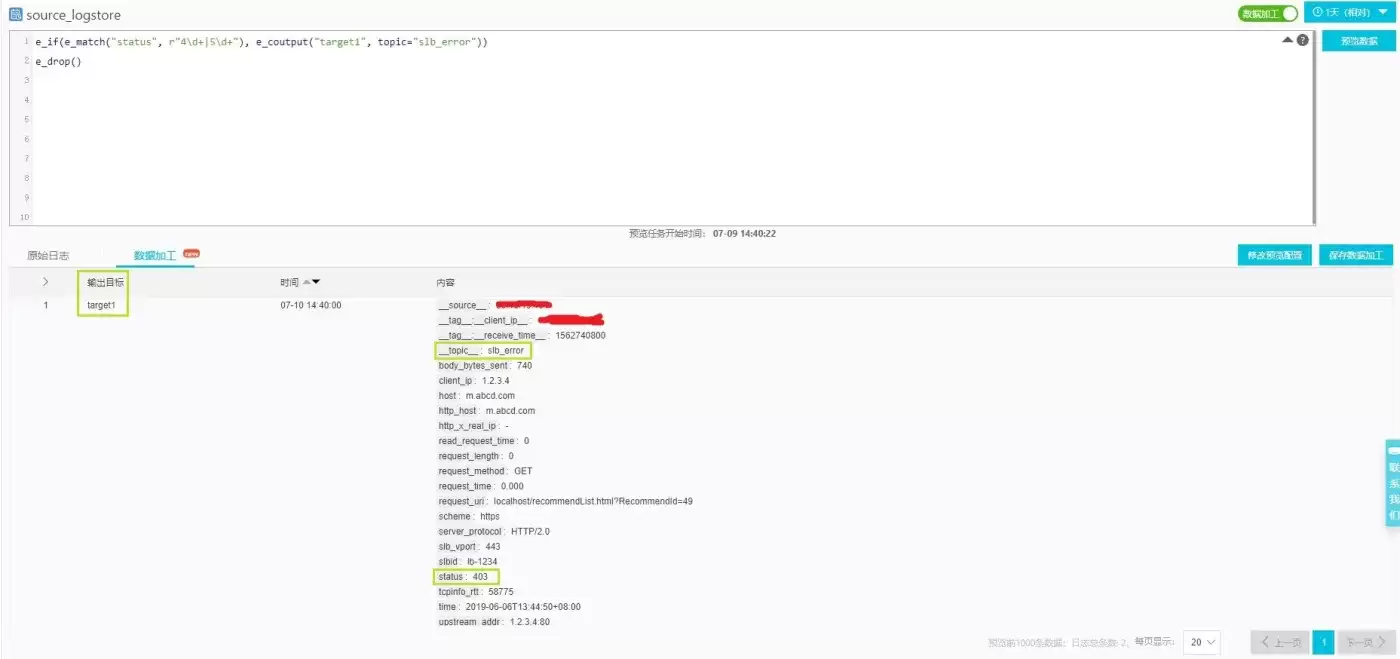
提取静态类请求日志并输出到sbl-log-media
在规则编辑框中更新如下规则(关于语法说明,可参考后续的章节):
# e_if(e_match("status", r"4d |5d "), e_coutput("target1", topic="slb_error"))e_regex("request_uri", r"([.w] .w )", "object_file")e_regex("object_file",r"(w )$", "object_type")e_if(v("object_file"), e_compose(e_keep_fields(F_META, r"object_w |request_uri|client_ip|host|request_time"),e_output(name="target2", topic="slb_media_request")))e_drop()
再点击【预览数据】,等一会,可以在【数据加工】标签页中看到结果,静态类请求将会被输出到target2的目标中。如前面需求描述,特定的字段被提取,并且还新增了2个字段object_file和object_type,并且topic设置为了slb_media_request: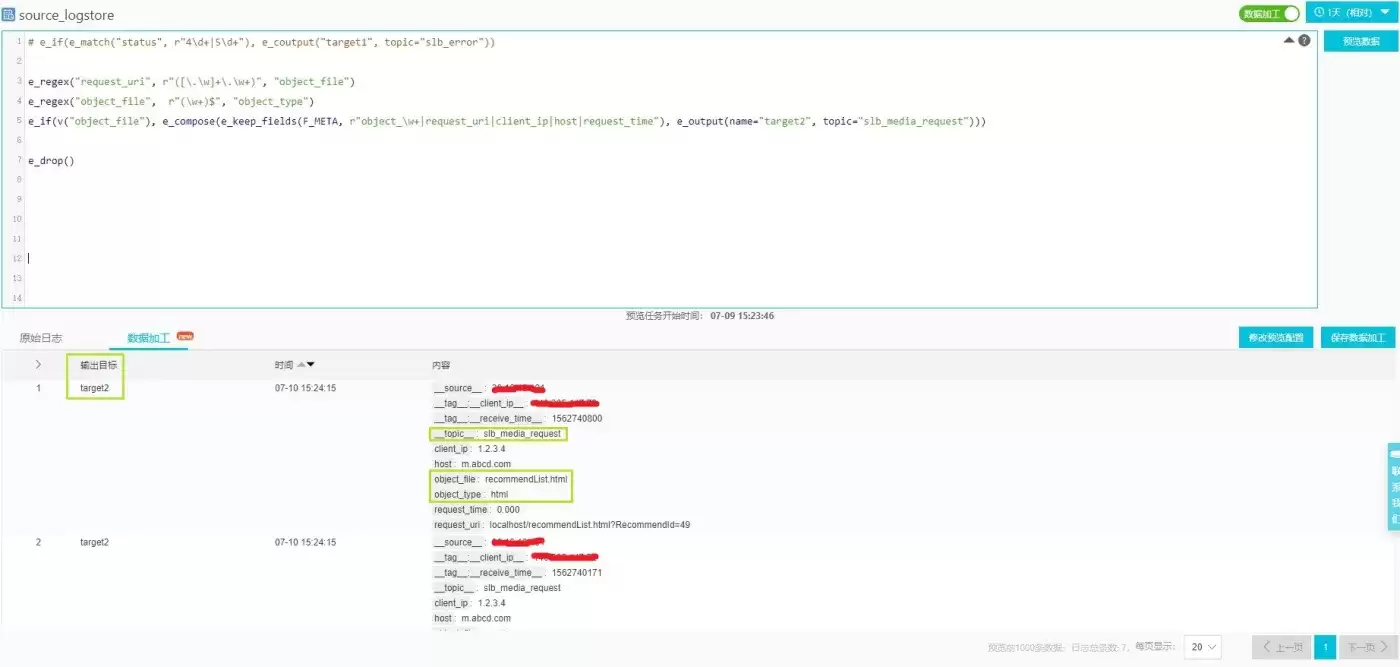
调整字段并输出正常请求日志到sbl-log-normal
在编辑框中更新如下规则(关于语法说明,可参考后续的章节):
# e_if(e_match("status", r"4d |5d "), e_coutput("target1", topic="slb_error"))# e_regex("request_uri", r"([.w] .w )", "object_file")# e_regex("object_file",r"(w )$", "object_type")# e_if(v("object_file"), e_compose(e_keep_fields(F_META, r"object_w |request_uri|client_ip|host|request_time"), #e_output(name="target2", topic="slb_media_request")))e_set("__topic__", "slb_normal")e_kv("request_uri", prefix="reqparam_")e_if(op_eq(v("http_x_real_ip"), "-"), e_set("http_x_real_ip", v('client_ip')))e_keep_fields(F_META, r"body_bytes_sent|client_ip|host|http_referer|http_x_real_ip|request_length","request_method|request_time|request_uri|scheme|slb_vport|slbid|status")
再点击【预览数据】,等一会,可以在【数据加工】标签页中看到结果,非媒体类请求将被输出到target0的目标中,如前面需求描述,特定的字段被提取,并且字段http_x_real_ip被设置成了非-的值,且topic设置为了slb_normal: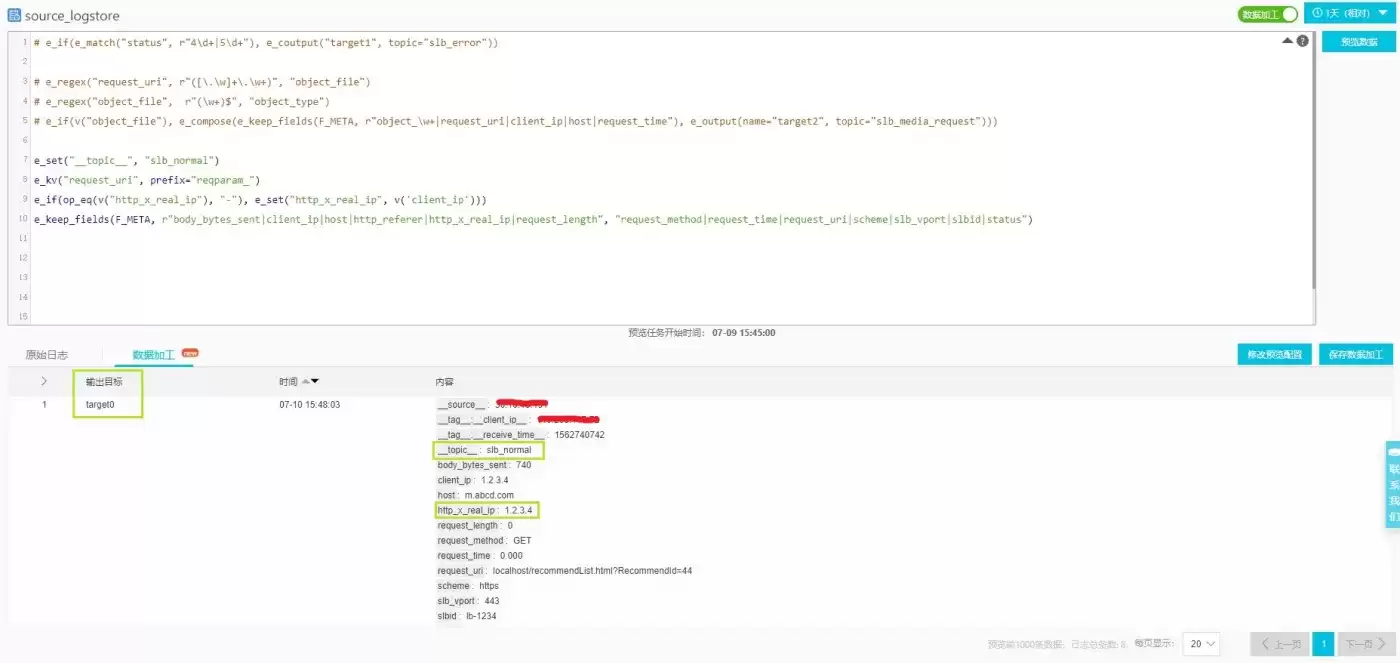
保存配置
最终加工规则
在确认规则正确后,去掉注释的部分,就是完整版本:
e_if(e_match("status", r"4d |5d "), e_coutput("target1", topic="slb_error"))e_regex("request_uri", r"([.w] .w )", "object_file")e_regex("object_file",r"(w )$", "object_type")e_if(v("object_file"), e_compose(e_keep_fields(F_META, r"object_w |request_uri|client_ip|host|request_time"),e_output(name="target2", topic="slb_media_request")))e_set("__topic__", "slb_normal")e_kv("request_uri", prefix="reqparam_")e_if(op_eq(v("http_x_real_ip"), "-"), e_set("http_x_real_ip", v('client_ip')))e_keep_fields(F_META, r"body_bytes_sent|client_ip|host|http_referer|http_x_real_ip|request_length","request_method|request_time|request_uri|scheme|slb_vport|slbid|status")
配置目标
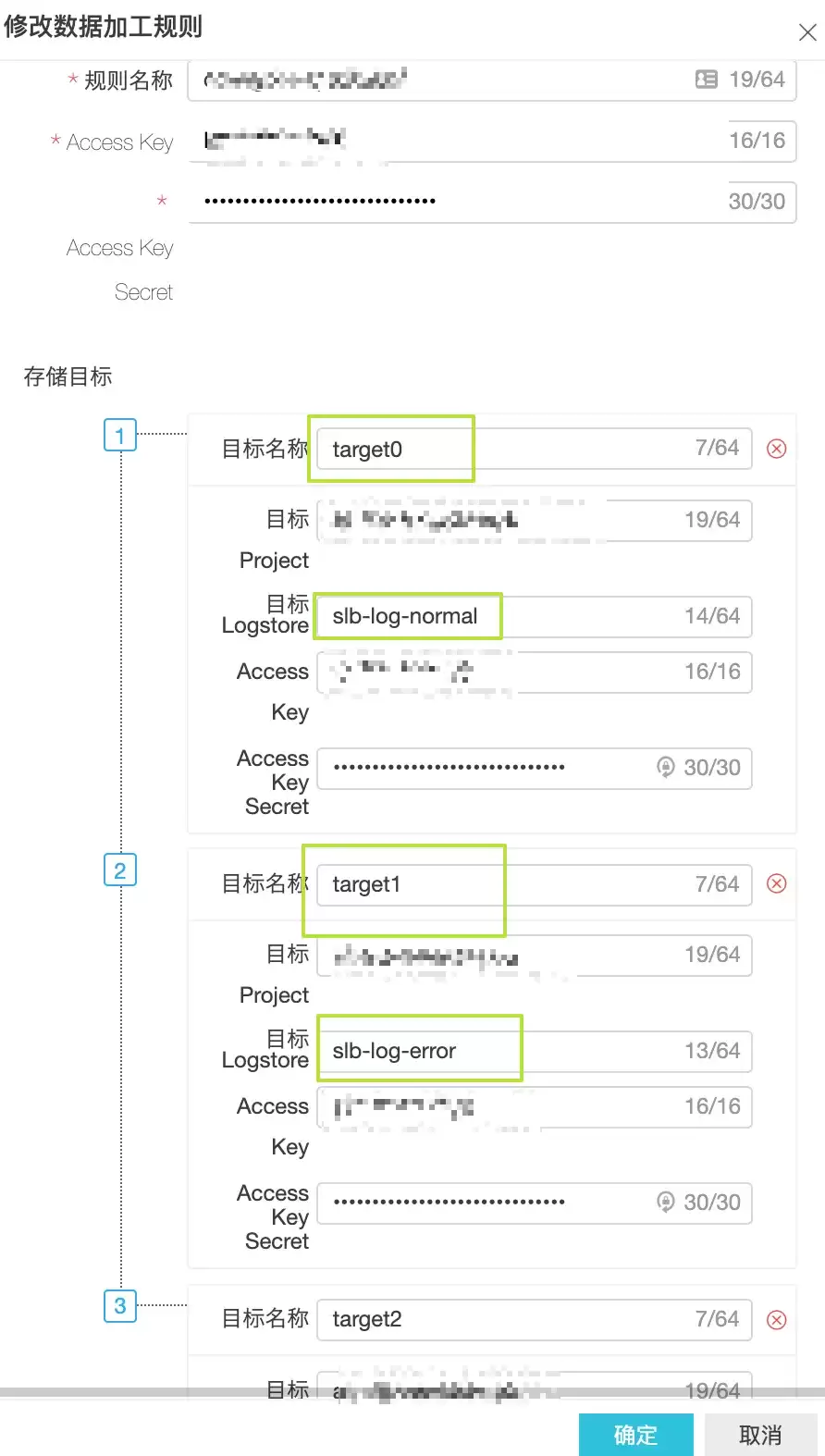
点击【保存加工配置】,在配置中,依据前面的需求,配置源logstore的秘钥(预览的时候已经配置了),以及3个目标logstore的Project名、logstore名和写入的AK秘钥。注意3个目标的逻辑名称需要与规则中应用的规则保持一致。
配置加工范围
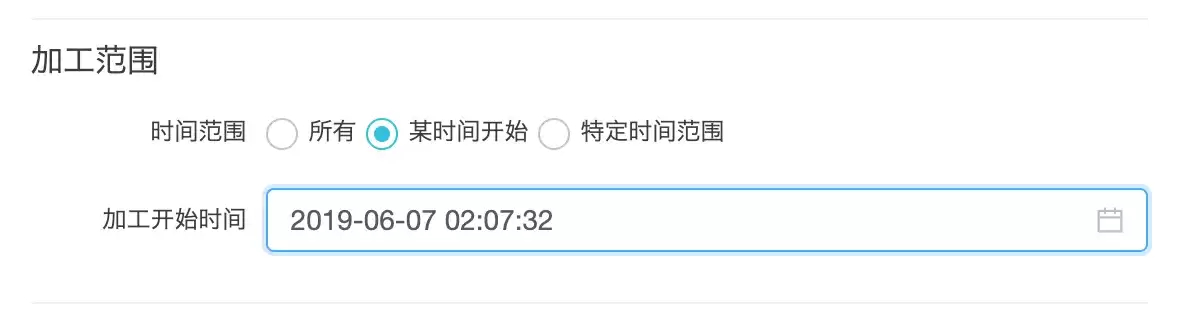
在加工范围中,可以根据情况选择【所有】、【某个时间开始】或者特定范围,这里选择【某个时间开始】,并选择此刻。那么保存后,新写入源logstore的数据将会自动应用规则写入到配置的3个目标去。
注意, 这里的时间是日志接收时间
加工任务管理与监控
任务管理
点击日志服务项目页面的左侧导航栏中的【数据加工】,可以看到保存的加工任务,可以根据情况选择修改、停止、重启等操作。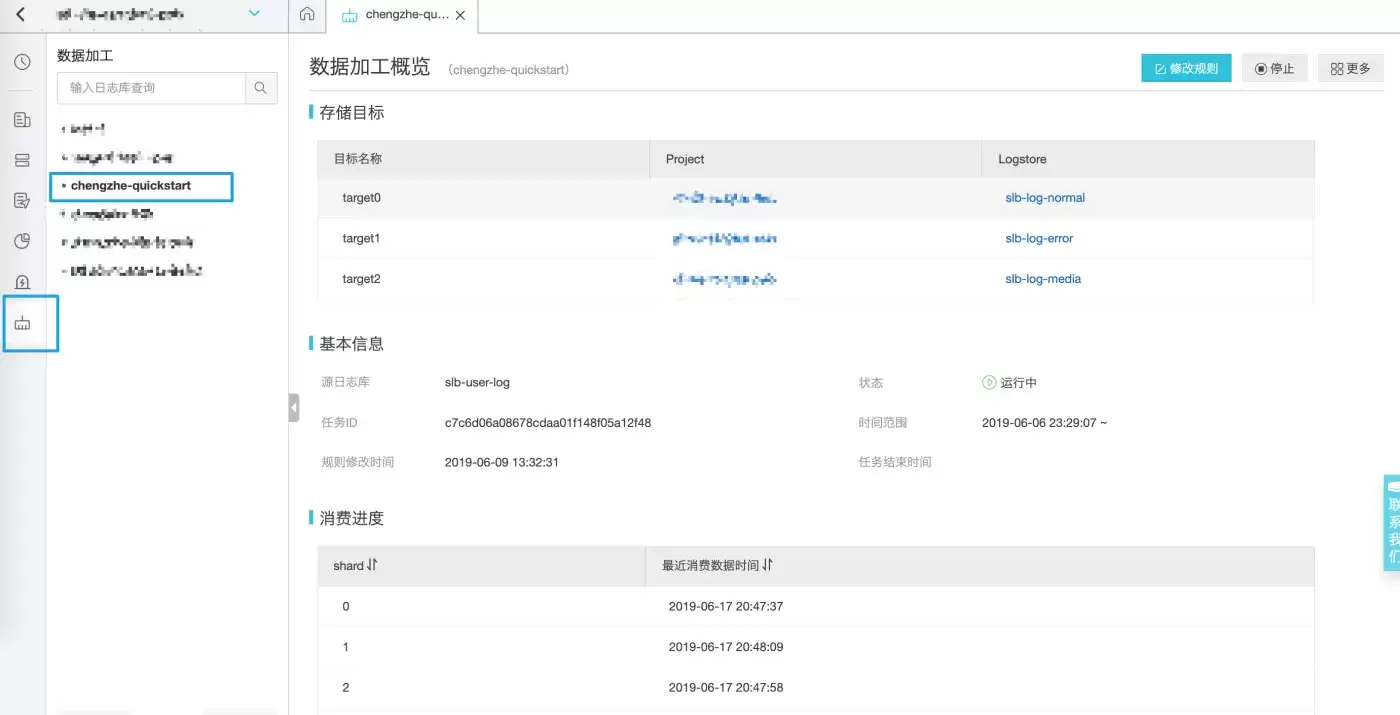
规则洞察
对于数据加工的任务详情中下方就是任务的执行状态: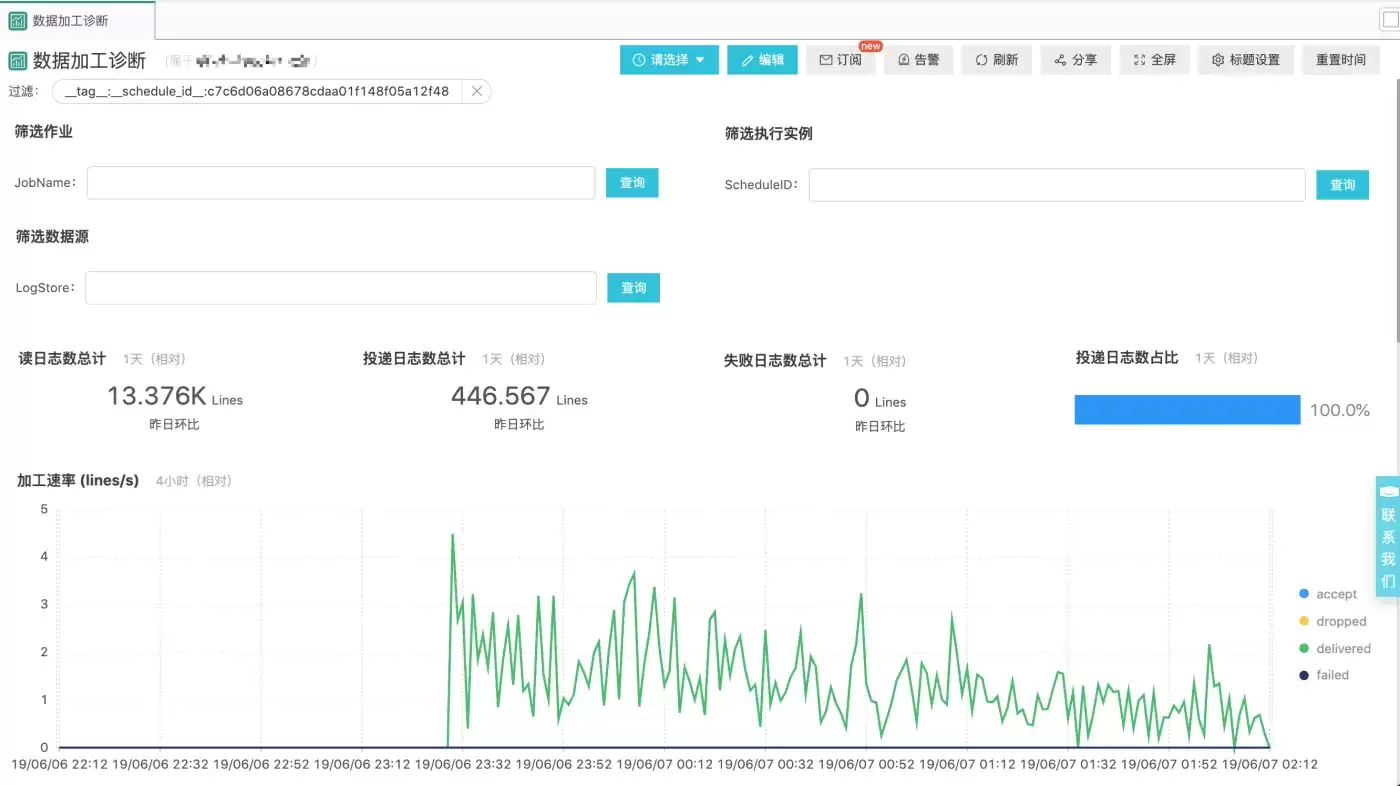
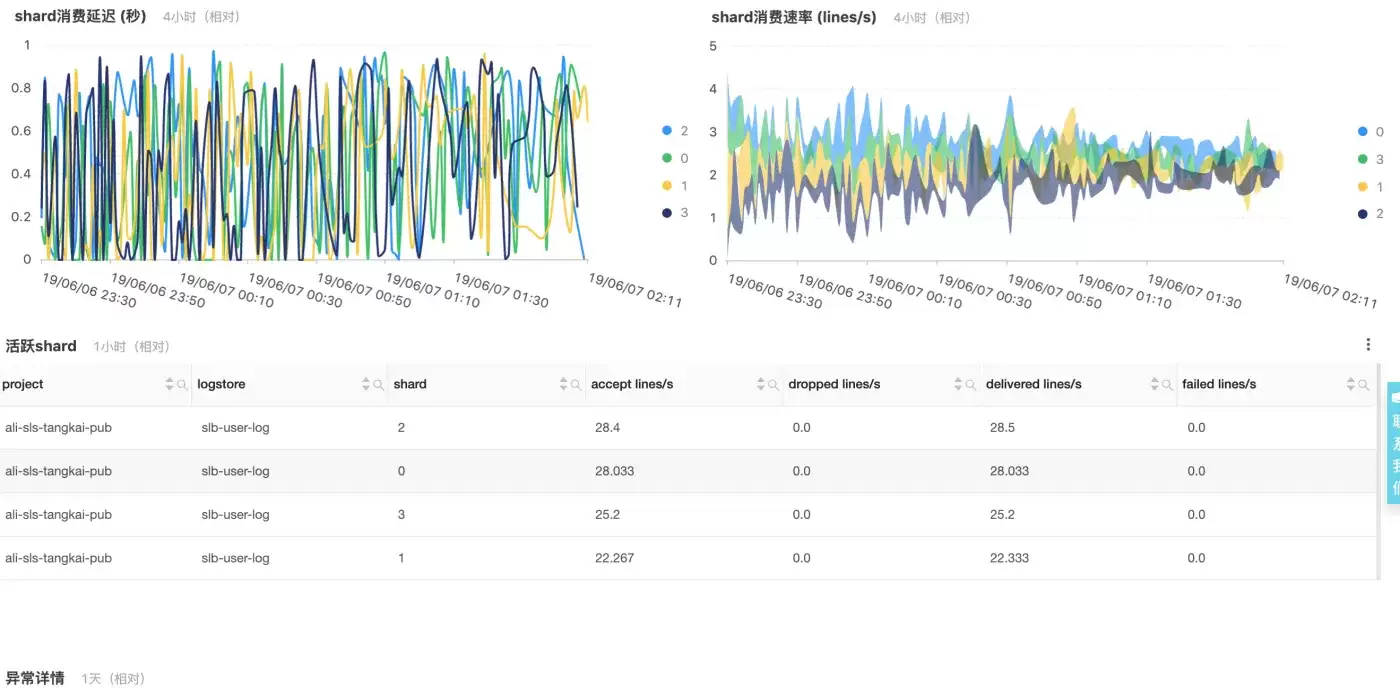
语法详细说明
第一次预览操作
规则
e_if(e_match("status", r"4d |5d "), e_coutput("target1", topic="slb_error"))e_drop()
说明
这里使用条件判断e_if(条件,操作),当条件e_match为真时,执行操作e_coutput。 操作e_match("status", r"4d |5d ")检查日志的status字段值是否为4XX或5XX的形式;Python语法中,字符串前面用r修饰,可以避免写两个e_coutput('target1', topic="slb_error") 表示复制一份数据并输出到目标target1中,并且将topic设置为slb_error 函数e_drop()表示丢弃所有剩余的日志;这里是为了预览的效果特意加上,实际保存的配置中不会有这句话。 第二次预览操作
规则
# e_if(e_match("status", r"4d |5d "), e_coutput("target1", topic="slb_error"))e_regex("request_uri", r"([.w] .w )", "object_file")e_regex("object_file",r"(w )$", "object_type")e_if(v("object_file"), e_compose(e_keep_fields(F_META, r"object_w |request_uri|client_ip|host|request_time"),e_output(name="target2", topic="slb_media_request")))e_drop()
详细说明
操作e_regex()表示从字段request_uri中提取了字段object_file,然后进一步从object_file中提取了object_type,如果object_file不存在,字段object_type也不会存在。e_compose(操作1,操作2)对两个操作进行组合,依次执行。e_if(条件,e_compose(操作1,操作2))表示对于字段object_file不为空的事件,保留特定字段,并且输出到target2,由于这里使用的是e_output而非e_coutput,因此这些事件被输出后不再后续处理。规则中的第一行步骤使用Python的语法方式#注释掉了,保留最后一行e_drop()的目的是方便预览。 第三次预览操作
规则
# e_if(e_match("status", r"4d |5d "), e_coutput("target1", topic="slb_error"))# e_regex("request_uri", r"([.w] .w )", "object_file")# e_regex("object_file",r"(w )$", "object_type")# e_if(v("object_file"), e_compose(e_keep_fields(F_META, r"object_w |request_uri|client_ip|host|request_time"), #e_output(name="target2", topic="slb_media_request")))e_set("__topic__", "slb_normal")e_kv("request_uri", prefix="reqparam_")e_if(op_eq(v("http_x_real_ip"), "-"), e_set("http_x_real_ip", v('client_ip')))e_keep_fields(F_META, r"body_bytes_sent|client_ip|host|http_referer|http_x_real_ip|request_length","request_method|request_time|request_uri|scheme|slb_vport|slbid|status")
详细说明
操作e_set()设置默认事件的__topic__操作e_kv(),对字段request_uri的值进行KV操作,自动提取其中的键值对并放到事件中。进一步的基于表达式函数op_eq设置了字段http_x_real_ip的值。最后e_keep_fields保留特定字段。这里没有使用e_output()等,因为默认会将事件输出到第一个配置的目标target0中。 进一步参考
日志服务最佳实践汇总(持续更新)完整DSL语法介绍与参考PDF下载(持续更新)数据加工指南
介绍:
功能概述概念原理快速开始:
快速开始(SLB日志加工实战)控制台操作源与目标访问秘钥配置作业诊断指南性能指南成本优化指南语法:
DSL语法介绍查询字符串语法JMES语法介绍管理配置:
子账号授权配置欢迎扫码加入官方钉钉群获得实时更新与阿里云工程师的及时直接的支持: