使用k8s部署wordpress的完整流程实用指南
作者:袖梨
2026-09-01
平时做技术实践时,很多问题不是概念不会,而是细节没串起来。拿“采用k8s部署wordpress的完整流程”来说,它看着像小点,放到项目里常会牵出环境、配置、兼容性和维护成本。下面按实际采用顺序,把思路、关键写法和容易踩坑的地方讲清楚,便于大家直接对照操作。
目录
- 一、部署流程:
- 二、 下载代码:
- 三、 Dockerfile
- 四、 运行数据库服务
- 五、准备nginx设置文件
- 六、准备链接数据库Secret
- 七、准备pvc共享图片
- 八、部署wordpress
- 九、发布wordpress
一、部署流程:
- 制作服务镜像
1.1 准备合适的基础镜像
1.2 准备代码相关文件
1.3 借助dockerfile构建镜像 - 制作kubernets 服务器,并完成调度
2.1 确定服务的运行模式,内部还是对外提供服务
2.2 确定服务所采用的控制器
2.3 服务是否需后端存储pvc
2.4 服务是否需service,Ingress等
二、 下载代码:
1 . 下载wordpress代码
[root@testserver01 ~]# wget  --no-check-certificate https://cn.wordpress.org/wordpress-6.0-zh_CN.tar.gz
[root@testserver01 ~]# tar xf wordpress-6.0-zh_CN.tar.gz
[root@testserver01 ~]# cd wordpress
- 理解这一步时,准备wp-config.php文件,修改数据库链接信息(采用变量,后期进行替换)、以及Authentication的key
[root@testserver01 wordpress]#cp wp-config-sample.php wp-config.php
[root@testserver01 wordpress]#vim wp-config.php
<?php
/**
 * The base configuration for WordPress
 *
 * The wp-config.php creation script uses this file during the installation.
 * You don't have to use the web site, you can copy this file to "wp-config.php"
 * and fill in the values.
 *
 * This file contains the following configurations:
 *
 * * Database settings
 * * Secret keys
 * * Database table prefix
 * * ABSPATH
 *
 * @link https://wordpress.org/support/article/editing-wp-config-php/
 *
 * @package WordPress
 */

// ** Database settings - You can get this info from your web host ** //
/** The name of the database for WordPress */
define( 'DB_NAME', '{DB_NAME}' );

/** Database username */
define( 'DB_USER', '{DB_USER}' );

/** Database password */
define( 'DB_PASSWORD', '{DB_PASSWORD}' );

/** Database hostname */
define( 'DB_HOST', '{DB_HOST}' );

/** Database charset to use in creating database tables. */
define( 'DB_CHARSET', 'utf8' );

/** The database collate type. Don't change this if in doubt. */
define( 'DB_COLLATE', '' );

/**#@+
 * Authentication unique keys and salts.
 *
 * Change these to different unique phrases! You can generate these using
 * the {@link https://api.wordpress.org/secret-key/1.1/salt/ WordPress.org secret-key service}.
 *
 * You can change these at any point in time to invalidate all existing cookies.
 * This will force all users to have to log in again.
 *
 * @since 2.6.0
 */
define('AUTH_KEY',         'y:{)hlVEfEp>R4V}+()^]Y>db|Y8@yY-;|hemOR|VA/5MUP;h7E&yR*FVYO9a?Rq');
define('SECURE_AUTH_KEY',  '^acJ;I/{:M|FM~UuxNN+)yU~e8/hMee _cDo/s*twtrdYxIp~p$|d0[dazi?} +A');
define('LOGGED_IN_KEY',    '=V_13`Sd@s?)-x6457G0EH/=z7^Vpj=/*>V,.ekFq}+N],[-IwVLwv>U`{P{]je7');
define('NONCE_KEY',        '3Ie XQ]ufX%Ae1r`:Sv{`,Qd.kSckouY8WN:+9~fn^D@Kd5-(/4)WWp1pwC0a Uv');
define('AUTH_SALT',        '#3QONR)9CXQuo<Y|*:q9~Tf`N?H|k>]W>U:>j^)3F A1B.%dq3+z;:m<fW.zS$Mh');
define('SECURE_AUTH_SALT', 'VSrV([c]]@/&?_,/2|8r6}t|Pz0|2Hovb{%.O*-)tk36_9X WE{ C<l 7++vHJ1%');
define('LOGGED_IN_SALT',   'O+mqUG`c7W,Zw:FKvIIhex+:B#7JxO|FQ!ABvjwg,!W3gw}u^I,8+G];3ePj+[G&');
define('NONCE_SALT',       'Y7eEkx7qggp7obhs<0og=e/j)(wn5GiR<D9bJ[4*A*?#2Ns>B=M:dpmo*`3Ix:oi');
/**#@-*/

/**
 * WordPress database table prefix.
 *
 * You can have multiple installations in one database if you give each
 * a unique prefix. Only numbers, letters, and underscores please!
 */
$table_prefix = 'wp_';

/**
 * For developers: WordPress debugging mode.
 *
 * Change this to true to enable the display of notices during development.
 * It is strongly recommended that plugin and theme developers use WP_DEBUG
 * in their development environments.
 *
 * For information on other constants that can be used for debugging,
 * visit the documentation.
 *
 * @link https://wordpress.org/support/article/debugging-in-wordpress/
 */
define( 'WP_DEBUG', false );

/* Add any custom values between this line and the "stop editing" line. */


/* That's all, stop editing! Happy publishing. */

/** Absolute path to the WordPress directory. */
if ( ! defined( 'ABSPATH' ) ) {
    define( 'ABSPATH', __DIR__ . '/' );
}

/** Sets up WordPress vars and included files. */
require_once ABSPATH . 'wp-settings.php';
三、 Dockerfile
- 结合项目来看,制作镜像过程中yum安装nginx、php比较慢,能够提前下载好rpm包
[root@testserver01 ~]#rpm -ivh https://mirror.webtatic.com/yum/el7/webtatic-release.rpm
[root@testserver01 ~]#yum install --downloadonly --downloaddir=./download nginx php71w-fpm php71w-xsl php71w php71w-ldap php71w-cli php71w-common php71w-devel php71w-gd php71w-pdo php71w-mysqL php71w-mbstring php71w-bcmath php71w-mcrypt
#如果还却依赖包,执行下条命令
[root@testserver01 ~]# yum install --downloadonly --downloaddir=./download  gcc gcc-c++ make zlib zlib-devel pcre pcre-devel libjpeg libjpeg-devel libpng libpng-devel freetype freetype-devel libxml2 libxml2-devel glibc glibc-devel glib2 glib2-devel bzip2 bzip2-devel ncurses ncurses-devel curl curl-devel e2fsprogs e2fsprogs-devel krb5 krb5-devel openssl openssl-devel openldap openldap-devel nss_ldap openldap-clients postgresql-devel libxslt-devel libmcrypt libmcrypt-devel
2 . 编写Dockerfile
[root@testserver01 wordpress]#vim Dockerfile
FROM docker.m.daocloud.io/centos:7

ENV Web_Dir="/usr/share/nginx/html"

RUN mkdir /download
COPY ./download/*.rpm /download/
RUN rpm -ivh --nodeps --force /download/*.rpm
RUN rm -rf ${Web_Dir}  /download/

COPY . ${Web_Dir}

RUN useradd -M www &&
    sed -i '/^user/c user www;' /etc/nginx/nginx.conf &&
    sed -i '/^user/c user = www' /etc/php-fpm.d/www.conf &&
    sed -i '/^group/c group = www' /etc/php-fpm.d/www.conf &&
    chown -R www.www  ${Web_Dir} /var/lib/nginx/

EXPOSE 80

COPY ./entrypoint.sh /entrypoint.sh
RUN chmod +x /entrypoint.sh
ENTRYPOINT ["bash","-c","/entrypoint.sh"]
3 准备启动脚本
[root@testserver01 wordpress ]# vim entrypoint.sh
#1.替换变量
Wordpress_File=/usr/share/nginx/html/wp-config.php

sed -i s/{DB_NAME}/${DB_NAME:-wordpress}/g ${Wordpress_File}
sed -i s/{DB_USER}/${DB_USER:-wordpress}/g ${Wordpress_File}
sed -i s/{DB_PASSWORD}/${DB_PASSWORD:-wordpress}/g ${Wordpress_File}
sed -i s/{DB_HOST}/${DB_HOST:-localhost}/g ${Wordpress_File}


#2. 启动nginx php
php-fpm &&
nginx -g "daemon off;"
- 构建镜像 并推送至私有仓库
[root@testserver01 wordpress ]# docker build -t harbor.xxxx.com/base/wordpress:v6.0 -f Dockerfile
[root@testserver01 wordpress ]# docker push harbor.xxxx.com/base/wordpress:v6.0
四、 运行数据库服务
集群内mysql
[root@master01 wordpress]# cat 01-mysql.yaml
###headless
apiVersion: v1
kind: Service
metadata:
  name: mysql-svc
spec:
  clusterIP: None
  selector:
    app: mysql
  ports:
  - port: 3306
    targetPort: 3306

---
### statefulset
apiVersion: apps/v1
kind: StatefulSet
metadata:
  name: mysql
spec:
  serviceName: mysql-svc
  replicas: 1
  selector:
    matchLabels:
      app: mysql
  template:
    metadata:
      labels:
        app: mysql
    spec:
      nodeName: node01.xxxx.com
      containers:
      - name: db
        image: harbor.xxxx.com/base/mysql:5.7
        imagePullPolicy: Always
        securityContext:
          privileged: true
        resources:
          requests:
            cpu: 1
            memory: 2Gi
          limits:
            cpu: 2
            memory: 4Gi
        env:
        - name: MYSQL_ROOT_PASSWORD
          value: 12345678
        - name: MYSQL_DATABASE
          value: wordpress
        ports:
        - containerPort: 3306
        volumeMounts:
        - name: data
          mountPath: /var/lib/mysql
        - name: mysqlconf
          mountPath: /etc/my.cnf
          subPath: my.cnf
      volumes:
      - name: mysqlconf
        configMap:
          name: mysql-config

  volumeClaimTemplates:
  - metadata:
      name: data
    spec:
      storageClassName: "nfs-provisioner-storage"
      accessModes:
      - "ReadWriteMany"
      resources:
        requests:
          storage: "20Gi"
[root@master01 wordpress]# cat mysql_conf.yaml
apiVersion: v1
kind: ConfigMap
metadata:
  name: mysql-config
data:
  my.cnf: |-
    [mysqld]
    max_connections = 100
    key_buffer_size = 32M
    max_allowed_packet = 16M
    thread_stack = 192K
    sort_buffer_size = 256K
    read_buffer_size = 256K
    read_rnd_buffer_size = 256K
    myisam_sort_buffer_size = 64M
    innodb_buffer_pool_size = 128M
集群外部mysql
- 准备外部mysql
[root@harbor002 wordpress]# docker run -p3306:3306  -e "MYSQL_ROOT_PASSWORD=oldxu3957" harbor.xxxx.com/base/mysql:5.7
[root@master01 wordpress]# vim 06-external-mysql.yaml
apiVersion: v1
kind: Service
metadata:
  name: mysql-external
spec:
  ports:
  - port: 3306
    targetPort: 3306
  clusterIP: None #表示这是一个 headless service,直接通过 Endpoint 连接
---
apiVersion: v1
kind: Endpoints
metadata:
  name: mysql-external #此名字需要于service中定义的name字段一致
subsets:
- addresses:
  - ip: 192.168.20.232 #定义外部mysql机器的ip地址
  ports:
  - port: 3306
五、准备nginx设置文件
- 编写nginx +php设置文件
[root@master01 wordpress]# cat wp.conf
server {
    listen 80;
    server_name _;

    root /usr/share/nginx/html;

    location / {
        index index.php;
    }

    location ~ .php$ {
        fastcgi_pass 127.0.0.1:9000;
        fastcgi_param SCRIPT_FILENAME $document_root$fastcgi_script_name;
        include fastcgi_params;

    }

}
- 把设置文件转为configmap
[root@master01 wordpress]# kubectl create configmap nginxconfs --from-file=./wp.conf
六、准备链接数据库Secret
把wordpress 连接数据库信息存储到secret
[root@master01 wordpress]# cat  04-wp-secret.yaml
apiVersion: v1
kind: Secret
metadata:
  name: wordpress-secret
stringData:
  DB_NAME: wordpress
  DB_USER: root
  DB_PASSWORD: oldxu3957
  #  DB_HOST: mysql-0.mysql-svc.default.svc.cluster.local
  DB_HOST: mysql-external.default.svc.cluster.local
七、准备pvc共享图片
新建pvc资源,共享wordpress的upload目录
[root@master01 wordpress]# cat 03-wp-pvc.yaml
# pvc申请,用来共享nfs图片,附件
apiVersion: v1
kind: PersistentVolumeClaim
metadata:
  name: wordpress-data
spec:
  storageClassName: "nfs-provisioner-storage"
  accessModes:
  - ReadWriteMany
  resources:
    requests:
      storage: 10Gi
八、部署wordpress
[root@master01 wordpress]# vim  02-wordpress.yaml
apiVersion: apps/v1
kind: Deployment
metadata:
  name: wordpress-deploy
spec:
  replicas: 1
  selector:
    matchLabels:
      app: wordpress
  template:
    metadata:
      labels:
        app: wordpress
    spec:
      containers:
      - name: wordpress
        image: harbor.ihavecar.com/base/wordpress:v6.0
          #imagePullPolicy: Always
        ports:
        - containerPort: 80
        envFrom:
        - secretRef:
            name: wordpress-secret
        volumeMounts:
        - name: config
          mountPath: /etc/nginx/conf.d/
        - name: images
          mountPath: /usr/share/nginx/html/wp-content/uploads/
      volumes:
      - name: config
        configMap:
          name: nginxconfs
      - name: images
        persistentVolumeClaim:
          claimName: wordpress-data
---
apiVersion: v1
kind: Service
metadata:
  name: wordpress-svc
spec:
  selector:
    app: wordpress
  ports:
  - port: 80
    targetPort: 80
九、发布wordpress
[root@master01 wordpress]# cat 05-wordpress-ingress.yaml
apiVersion: networking.k8s.io/v1
kind: Ingress
metadata:
  name: wordpress-ingress
spec:
  ingressClassName: "nginx"
  rules:
  - host: "wordpress.xxxx.com"
    http:
      paths:
      - path: /
        pathType: Prefix
        backend:
          service:
            name: wordpress-svc
            port:
              number: 80
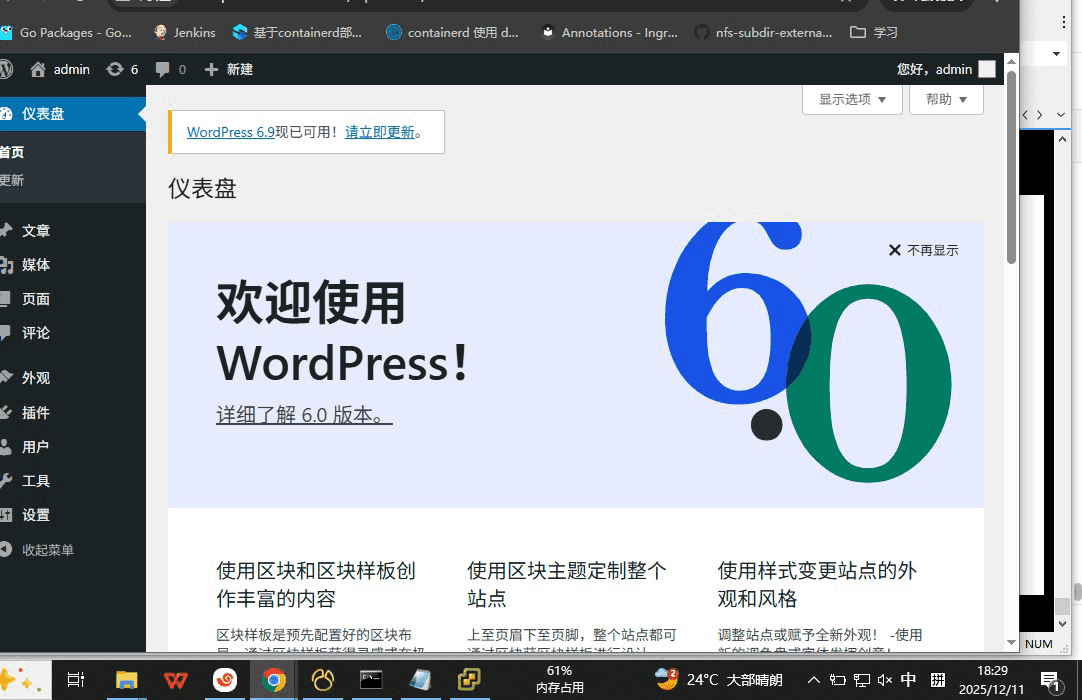
访问测试
总结
您可能感兴趣的文章:
- Docker搭建 Nginx+PHP+MySQL 环境同时部署WordPress实践
- 在Ubuntu 14.04上部署 PHP 环境及 WordPress
- 采用docker compose一键部署WordPress博客的方法
- Nginx服务LNMP之WordPress部署流程步骤
- 详解kvm部署三个虚拟机实现 WordPress 实验
- docker部署lnmp-wordpress的实现步骤
- Linux采用yum安装lamp以及部署wordpress实践