Liunx系统安装MySQL实践
该文章是介绍的是 Ubuntu 操作系统,如果有使用 CentOS 的小伙伴不会的话可以私信我~
1. 查找安装包
apt list |grep "mysql-server"
2. 安装mysql
sudo apt install mysql-server
注意:安装的到最后一步会问你是否继续,输入y / Y就行
After this operation, 243 MB of additional disk space will be used.
Do you want to continue? [Y/n]
3. 查看是否安装成功
sudo systemctl status mysql
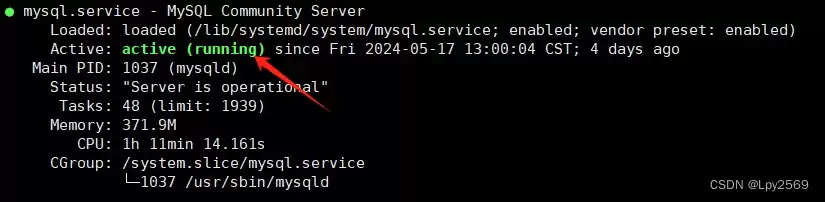
出现这种就是安装成功了
4. 设置安全设置
安装安全设置
sudo mysql_secure_installation
接着会提示你是否设置验证密码,输入y/Y就行
Press y|Y for Yes, any other key for No:
然后设置密码强度(0为最弱等级,1中等,2最强),我设置的是2等级
Please enter 0 = LOW, 1 = MEDIUM and 2 = STRONG: 2
| 密码等级 | 要求 | 示例 |
|---|---|---|
| LOW | 密码长度至少8个字符。 | password123 |
| MEDIUM | 1. 密码长度至少8个字符。2. 包含数字、大小写字母、特殊字符。 | Password1! |
| STRONG | 1. 密码长度至少8个字符。2. 包含数字、大小写字母、特殊字符。3. 不得包含用户姓名或用户名(用户登录数据库时使用的标识符)的任何部分。 | P@ssw0rdExample!2024 |
默认情况下,MySQL安装有⼀个匿名用户,允许任何人登录MySQL。询问你是否删除匿名用户?
Remove anonymous users? (Press y|Y for Yes, any other key for No) :
设置只允许root用户进行连接
Disallow root login remotely? (Press y|Y for Yes, any other key for No) :
MySQL带有⼀个test数据库, 是否删除?
Remove test database and access to it? (Press y|Y for Yes, any other key for No) :
是否现在加载配置, 使刚才的修改生效?
Reload privilege tables now? (Press y|Y for Yes, any other key for No) :
5. 设置密码
连接mysql服务器
sudo mysql
修改密码(根据上面你设置的密码等级来)
ALTER USER 'root'@'localhost' IDENTIFIED WITH mysql_native_password BY 'your password'
总结
以上为个人经验,希望能给大家一个参考,也希望大家多多支持本站。
您可能感兴趣的文章:- Liunx和Windows中如何重启MySql
相关文章
-
DeepSeek多模态怎么样及保姆级配置教程(codex、claude)实用指南
游戏攻略 2026-10-17
-
WSL2+Docker+Ollama本地部署大模型思路和实践指南(Qwen1.8b)实用指南
游戏攻略 2026-10-17
-
DeepSeek Harness热门插件盘点:10个实用插件,覆盖多Agent、上下文和多模态实用指南
游戏攻略 2026-10-17
-
grep文本搜索与正则表达式完整代码示例实用指南
游戏攻略 2026-10-16
-
AI漫剧伪装直男1‑24集无雾版夸克网盘资源免费分享
游戏攻略 2026-10-15
-
AI漫剧玉僧入尘1-68集无雾无删版夸克网盘资源免费分享
游戏攻略 2026-10-15