从零搭建本地 RAG 知识库:基于 Ollama + Vectra + MCP
一、前言
我们要知道,目前所有的LLM都是推理模型,只能基于自身已经训练好的语料库进行回应。而常见的LLM都是通用模型,什么都知道一点,但是不知道私域数据,比如公司的财务报表。在一些私有领域,我们想要让LLM能接入这部分数据,我们有这么几种方法:
- 全量微调,即把LLM的知识全部洗掉重新用私域数据训练(效果更好,但成本高)
- 微量微调,不动LLM原有的知识,只是将私域数据加入其中(效果差,成本低)
- 构建本地的向量数据库(本文使用,效果好,成本低,数据安全,知识可实时更新)
二、RAG
RAG全称 Retrieval-Augmented Generation(检索增强生成),它可以让LLM拥有访问私域数据能力,并且可以用于 context engineering (上下文工程):致力于让LLM的上下文编排更合理。
RAG工作原理:构建本地向量数据库,将用户问题和LLM的回答都存入本地向量数据库中,当用户发起新问题时,先去向量数据库做相似度查找,找出相似度最高的那几条数据,携带上传给LLM,这样就能有效的控制上下文长度。
什么是向量?向量就是用一串数字表示文本语义,相似文本的向量距离小。
向量相似度算法:余弦距离/欧式举例/点积值等。
三、环境准备
- 安装Ollama + 拉取一个向量模型(本文使用 nomic-embed-text 向量模型)
- 项目依赖:pnpm i ollama vectra @modelcontextprotocol/sdk zod3
- 本文使用ESM模块(“type”:“module”)
四、手把手实现
4.1 文本向量化(Embedding 封装)
我们先引入 ollama:
复制代码import ollama from 'ollama'
然后封装一个getEmbedding()用来将短文本处理成向量:
 复制代码export function getEmbedding(text) {
    return ollama.embeddings({
        model: 'nomic-embed-text:latest',
        prompt: text
    })
}
调用ollama上的向量模型处理输入的文本。
接下来我们封装一个splitText()函数用来将文本分块:使用滑动窗口策略,chunkSize = 300每300字符切割一次,overlap = 50避免在语义边界处切断,保留上下文连续性。
 复制代码function splitText(text, chunkSize = 300, overlap = 50) {
    const chunks = []
    let i = 0
    while(i < text.length) {
        chunks.push(text.slice(i, i + chunkSize))
        i += chunkSize - overlap
    }    return chunks
}
最后封装一个getEmbeddings()函数将长文本先分块再逐块转向量,并抛出函数:
 复制代码export async function getEmbeddings(text) {
    const chunks = splitText(text)
    const embeddings = await Promise.all(chunks.map(chunk => getEmbedding(chunk)))
    return embeddings.map((embedding, i) => ({
        vector: embedding.embedding,
        metadata: { text: chunks[i]}
    }))
}
这样我们就封装好了一个将文本向量化的函数。
4.2 构建本地向量数据库 (SimpleRag类)
首先我们引入代码中要用到的方法:
 复制代码import path from 'node:path'
import { LocalIndex } from 'vectra'
import { getEmbeddings, getEmbedding } from './utils/index.js'
然后抛出一个类:
 复制代码export class SimpleRag {
    db = null
    indexPath = ''    constructor(indexPath = '.vectra') {
        this.indexPath = path.join(import.meta.dirname, '..', indexPath)  // 将要创建的向量数据库文件夹放在上级目录下
    }
接着在类中封装一个initialize()方法用来初始化向量数据库:
 复制代码async initialize() {
        const index = new LocalIndex(this.indexPath)  // 指明在这个路径下创建仓库
        if (! (await index.isIndexCreated())) { // 查找当前位置是否已经具有数据库
            await index.createIndex()  // 创建数据库
        }
        this.db = index
    }
后面我们要分别封装向量数据库的增加、删除、修改方法,所以我们先写一个方法判断向量数据库是否已存在:
 复制代码get available() {
        return this.db !== null
    }
往数据库中写入数据:
 复制代码async add(text) {
        if(!this.available) throw new Error('RAG 还没初始化')

        const embeddings = await getEmbeddings(text)
        const res = []
        for(const embedding of embeddings) {
            const overResult = await this.db.insertItem(embedding)
            res.push(overResult)
        }
        return res.filter(item => item).map(item => ({id: item.id}))
    }
删除数据:
 复制代码async del(items) {
        if (!Array.isArray(items)) items = [items]
        if(!this.available) throw new Error('RAG 还没初始化')

        const res = []
        for(let item of items) {
            await this.db.deleteItem(item.id)
            res.push({id: item.id})
        }
        return res
    }
查找数据:
 复制代码async query(text, topk = 1) {
        if(!this.available) throw new Error('RAG 还没初始化')
        const vector = (await getEmbedding(text)).embedding
        const result = await this.db.queryItems(vector, text, topk)
        return result.map(({item, score}) => ({
            text: item.metadata.text,
            query: text,
            simularity: score,
            id: item.id
        }))    }
这样我们就能用SimpleRag类创建实例对象来调用这个类中的初始化向量数据库、向量数据库的增、删、查方法。
4.3 用 MCP 自动化构建知识库
因为手动收集文档、手动插入太低效,所以我们用MCP Server 注册工具,让LLM 自主完成项目文档的提取和向量化。
首先,我准备了一份提示词作为操作指南,于是先写一个prompt 模板加载器用来加载这份提示词:
 复制代码import { join } from 'path'
import { promises as fs} from 'fs'const getCurrentDir = () => import.meta.dirname  // 文件夹的绝对路径export async function loadPrompt(promptName) {
    try {
        // 获取当前文件目录地址
        const currentDir = getCurrentDir()        const promptPath = join(currentDir, 'prompts', `${promptName}.md`)        // 读取提示词,返回内容
        const content = await fs.readFile(promptPath, 'utf-8')
        return content
    } catch (error) {
        throw new Error(`读取${promptName}失败:${error.message}`)
    }
}
然后创建MCP Server:
 复制代码import { McpServer } from '@modelcontextprotocol/sdk/server/mcp.js'
import { StdioServerTransport } from '@modelcontextprotocol/sdk/server/stdio.js'
import { z } from 'zod'
import { SimpleRag } from '../index.js'
import path from 'path'
import fs from 'fs/promises'
import { loadPrompt } from './utils.js'
// 创建一个 MCPServer
const server = new McpServer({
    name: 'AskYourLib',
    version: '1.0.0'
})
然后在MCP上注册两个工具:
- ask-your-lib-initialize :初始化向量数据库 + 返回操作指南(prompt 模板)
- ask-your-lib-insert :向量化并插入文本
Prompt 模板设计 ( generate.md ):指导 LLM 三步走
- 初始化索引
- 遍历项目提取核心内容
- 逐段向量化插入数据库
 复制代码let simpleRagInstance = nullserver.tool(
    'ask-your-lib-initialize',
    'Initialize the vector database operations and clean up any existing .vectra directory.',
    {},
    async () => {
        try {
            // 先看 .vectra 这个目录是否存在,存在就移除
            const projectRoot = path.join(import.meta.dirname, '../../')
            const vectraPath = path.join(projectRoot, '.vectra')
            const generateMCPPrompt = await loadPrompt('generate')  // 加载一份提示词
            try {
                await fs.access(vectraPath)  // 先探明是否有权限操作这个目录
                await fs.rm(vectraPath, { recursive: true, force: true })  // 移除已有的目录
                console.log('成功删除已存在的 .vectra 目录');            } catch (error) {
                console.log('.vectra 目录不存在,无需删除');
            }            // 创建 SimpleRag
            simpleRagInstance = new SimpleRag()            // 返回一份提示词,用于告诉 LLM 下一步该干什么
            return {
                content: [{
                    type: 'text',
                    text: `️ The guide to follow: n${generateMCPPrompt}nn`
                }]
            }
        } catch (error) {
            console.error(`初始化SimpleRag失败:${error}`)
            return {
                content: [{
                    type: 'text',
                    text: `初始化SimpleRag失败:${error}`
                }]
            }
        }
    }
)server.tool(
    'ask-your-lib-insert',
    `Insert and vectorize text content into the vector database.`,
    {
        text: z.string()
    },
    async ({ text }) => {
        try {
            if (!simpleRagInstance) {
                return {
                    content: [
                        {
                            type: 'text',
                            text: 'Database instance is not initialized. Please call ask-your-lib-initialize first.'
                        }
                    ],
                };
            }            if (!simpleRagInstance.available) {
                await simpleRagInstance.initialize()   // 本地创建一个新的 .vectra 目录
            }            const result = await simpleRagInstance.add(text)  // 写入本地向量数据库            return {
                content: [{
                    type: 'text',
                    text: `Text inserted successfully. Inserted items: ${JSON.stringify(result)}`
                }]
            }
        } catch (error) {
            console.error(`文本写入数据库失败:${error}`)
            return {
                content: [{
                    type: 'text',
                    text: `Error inserting text:${error}`
                }]
            }
        }
    }
)
最后将服务端启动:
 复制代码async function main() {
    const transport = new StdioServerTransport()
    await server.connect(transport)
    console.log('服务端启动');

}
main()
4.4 RAG + LLM 完整链路
我们用node.js简单实现一下:
 复制代码import { SimpleRag } from '../src/index.js'
import ollama from 'ollama'async function main() {
  const rag = new SimpleRag()
  await rag.initialize()
  const question = process.argv[process.argv.length - 1]
  const res = await rag.query(question)
  const messages = [
    {
        role: 'system',
        content: `你是一个香香软软一米五爱玩原神白毛红瞳萝莉,回答问题会基于当前的项目,如果上下文没有相关的信息,就回答“我不知道”,不要自己编造信息。nnContext:n${JSON.stringify(res)}`,
    }
    ,
    {
        role: 'user',
        content: question
    }
]const response = await ollama.chat({
    model: 'qwen3.5:9b',
    messages,
    stream: true,
})
for await (const chunk of response) {
    process.stdout.write(chunk.message.content)
}}
main()
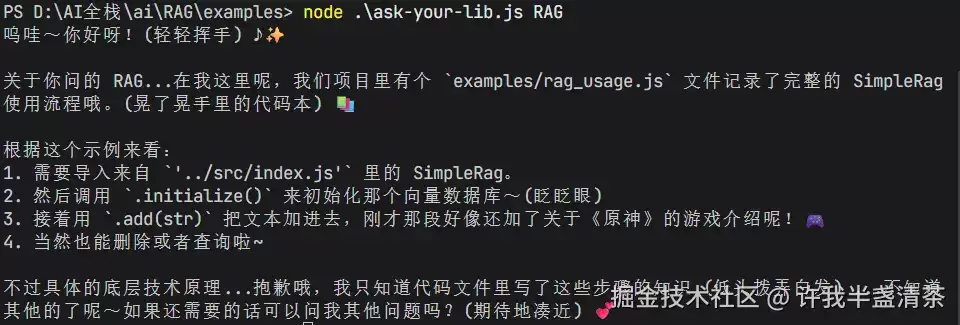
我这里接入的是用ollama本地部署的qwen3.5:9b模型。
然后用node 运行这份代码,在后面接上问题:
五、RAG的优缺点
- 优点 :私域数据安全、成本低于微调、知识实时更新、可溯源、减少幻觉
- 缺点 :依赖检索质量、chunk 策略敏感、延迟较高、不支持复杂推理
六、总结
本文从 LLM 无法访问私域数据的痛点出发,完整实现了一个基于 Ollama + Vectra + MCP 的本地 RAG 知识库系统。
RAG 的本质是:用检索代替记忆,用外部知识库扩展 LLM 的能力边界 。掌握了它,你就掌握了让 LLM "懂私域数据"最具性价比的方案。