
SpringBoot集成Spring AI Alibaba实现工具调用实战操作步骤
作者:袖梨
2026-08-05
SpringBoot集成Spring AI Alibaba实现工具调用实战操作步骤需要先看清适用场景和关键步骤,避免只记结论却忽略实际限制。
前言
让大模型在对话中调用你写好的 Java 方法(查时间、查天气等)。
版本
- Spring Boot:
3.4.5 - spring-ai-alibaba-starter-dashscope:
1.1.2.1 - Java:
17
Spring-ai更新速度快,请以官方为准
一、依赖引入
<dependency> <groupId>org.springframework.boot</groupId> <artifactId>spring-boot-starter-web</artifactId></dependency><dependency> <groupId>com.alibaba.cloud.ai</groupId> <artifactId>spring-ai-alibaba-starter-dashscope</artifactId> <version>1.1.2.1</version></dependency><!-- dashscope-sdk 可能带旧版 jsonschema-generator,与 spring-ai-model 冲突时需对齐 --><dependencyManagement> <dependencies> <dependency> <groupId>com.github.victools</groupId> <artifactId>jsonschema-generator</artifactId> <version>4.38.0</version> </dependency> </dependencies></dependencyManagement><dependency> <groupId>com.alibaba</groupId> <artifactId>dashscope-sdk-java</artifactId> <version>2.22.18</version> <exclusions> <!-- 避免与 Boot 自带的 logback 双绑 SLF4J --> <exclusion> <groupId>org.slf4j</groupId> <artifactId>slf4j-simple</artifactId> </exclusion> </exclusions></dependency>
二、yml 配置
spring: application: name: spring-tool-demo ai: dashscope: api-key: ${DASHSCOPE_API_KEY} chat: options: # 需支持 Tool Calling 的对话模型 model: qwen-max temperature: 0.7三、代码案例:声明式工具(@Tool)
1. 日期工具
@Component // 交给 Spring 管理,便于注入到 ChatClientpublic class DateTool { /** * description 很重要:模型靠它判断「什么时候该调这个工具」。 * 工具名默认是方法名 getCurrentDateTime。 */ @Tool(description = "Get the current date and time in the user's timezone") public String getCurrentDateTime() { // 返回给模型的真实数据;模型再组织成自然语言回复用户 return DateFormatUtil.now(); // 例如 yyyy-MM-dd HH:mm:ss }}2. 天气工具(普通业务方法 + @Tool)
@Componentpublic class WeatherTool { /** * 查询指定城市天气。 * district 建议用拼音,如 beijing / shanghai,方便模型稳定传参。 */ @Tool(description = "查询指定城市的天气情况") public String getWeather(String district) { // 这里用 switch 模拟业务;真实项目可调第三方天气 API return switch (district) { case "beijing" -> "天气清凉"; case "shanghai" -> "天气炎热"; case "guangzhou" -> "天气闷热"; default -> "未知地区"; }; }}四、注册到 ChatClient(defaultTools)
@Configurationpublic class ClientConfig { /** * 构建带默认工具的 ChatClient。 * defaultTools:该 Client 每次对话都可用这些工具。 */ @Bean(name = "toolClient") public ChatClient toolClient(DashScopeChatModel chatModel, DateTool dateTool, WeatherTool weatherTool) { return ChatClient.builder(chatModel) // 传入带 @Tool 方法的对象实例即可,框架会扫注解并生成 Schema .defaultTools(dateTool, weatherTool) .build(); }}注意:若已在 defaultTools 注册,请求里不要再写 .tools(new DateTool()),否则会报:
Multiple tools with the same name (getCurrentDateTime) found
defaultTools 与单次 .tools()二选一(或确保工具名不重复)。
五、Controller 调用
1. 查当前时间
@RestControllerpublic class TestController { @Resource(name = "toolClient") private ChatClient toolClient; /** * GET /get/currenttime * 用户说「要当前时间」→ 模型决定调用 getCurrentDateTime → 把结果组织成回答 */ @GetMapping("/get/currenttime") public String getCurrentTime() { return toolClient.prompt() .system("You are a helpful assistant.") .user("Get the current date and time in the user's timezone") // 不要再 .tools(...),工具已在 defaultTools 里 .call() .content(); }}2. 查天气
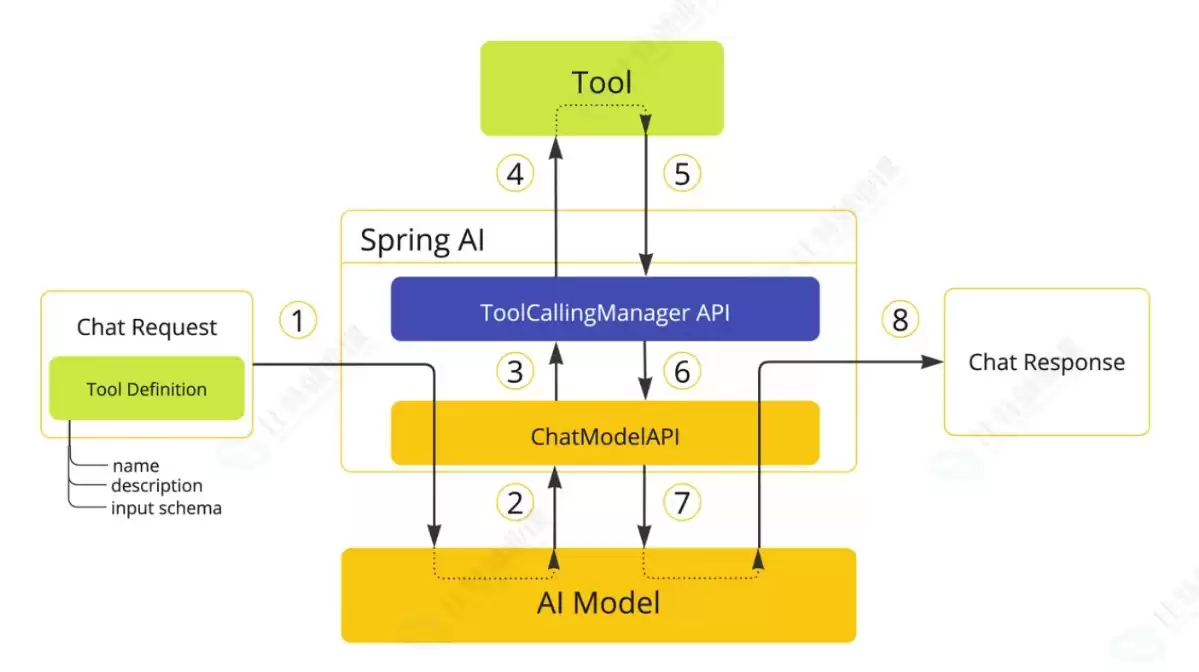
@RestControllerpublic class WeatherController { @Resource(name = "toolClient") private ChatClient toolClient; /** * GET /get/weather?district=上海 * system 提示把中文城市转成拼音参数,和 WeatherTool 的 case 对齐 */ @GetMapping("/get/weather") public String getWeather(@RequestParam String district) { return toolClient.prompt() .system("你可以通过工具获取天气情况," + "中文请转换成拼音作为调用工具的参数,例如上海对应'shanghai'") .user("查一下" + district + "的天气") .call() .content(); }}六、调用流程
相关文章
-
DeepSeek多模态怎么样及保姆级配置教程(codex、claude)实用指南
游戏攻略 2026-10-17
-
WSL2+Docker+Ollama本地部署大模型思路和实践指南(Qwen1.8b)实用指南
游戏攻略 2026-10-17
-
DeepSeek Harness热门插件盘点:10个实用插件,覆盖多Agent、上下文和多模态实用指南
游戏攻略 2026-10-17
-
grep文本搜索与正则表达式完整代码示例实用指南
游戏攻略 2026-10-16
-
AI漫剧伪装直男1‑24集无雾版夸克网盘资源免费分享
游戏攻略 2026-10-15
-
AI漫剧玉僧入尘1-68集无雾无删版夸克网盘资源免费分享
游戏攻略 2026-10-15








