
SpringBoot+MyBatis-Flex之数据库连接信息加密实战指南
作者:袖梨
2026-08-10
在 Spring Boot 项目开发中,我们通常会在application.properties或application.yml配置文件中直接填写数据库连接信息(URL、用户名、密码)。这种方式虽然便捷,但存在一个致命的安全隐患:连接信息以明文形式存储。一旦配置文件泄露(如代码提交到 Git 仓库、服务器被入侵等),数据库将直接面临被攻击的风险。
下文会针对这一问题,详细介绍两种在 Spring Boot 项目中实现数据库连接信息加密的方案,帮助你彻底解决配置明文存储的安全问题。
一、为什么必须加密数据库连接信息?
在讲解方案前,我们先明确加密的必要性,避免 “为了加密而加密” 的误区:
- 代码仓库泄露风险:开发者若不慎将包含明文密码的配置文件提交到公开 Git 仓库,任何人都能获取数据库权限。
- 服务器运维风险:服务器上的配置文件可能被运维人员或黑客查看,直接暴露核心数据库信息。
- 合规性要求:金融、医疗等行业的合规标准(如等保 2.0)明确要求敏感信息必须加密存储,明文存储属于违规操作。
因此,对数据库连接信息(尤其是密码)进行加密,是项目安全防护的基础且必要的一步。
二、具体实现
1.创建解密加密工具类具体代码如下
package xyz.huanziheng.pet.utils;import javax.crypto.Cipher;import javax.crypto.KeyGenerator;import javax.crypto.SecretKey;import javax.crypto.spec.SecretKeySpec;import java.nio.charset.StandardCharsets;import java.security.*;import java.security.spec.PKCS8EncodedKeySpec;import java.security.spec.X509EncodedKeySpec;import java.util.Base64;/** * @author fanmengze * @date 2023/11/13 21:59 **/public class EncryptionUtil { /** * 生成AES密钥 * * @param password 密码 * @return 密钥 * @throws NoSuchAlgorithmException 密钥生成算法不支持异常 */ private static SecretKey generateAESKey(String password) throws NoSuchAlgorithmException { KeyGenerator keyGenerator = KeyGenerator.getInstance("AES"); keyGenerator.init(128); byte[] passwordBytes = password.getBytes(StandardCharsets.UTF_8); MessageDigest digest = MessageDigest.getInstance("SHA-256"); byte[] keyBytes = digest.digest(passwordBytes); return new SecretKeySpec(keyBytes, "AES"); } /** * 对称加密算法AES加密 * * @param plaintext 明文 * @param password 密码 * @return 加密后的密文 * @throws Exception 加密异常 */ public static String encryptWithAES(String plaintext, String password) throws Exception { Cipher cipher = Cipher.getInstance("AES"); SecretKey secretKey = generateAESKey(password); cipher.init(Cipher.ENCRYPT_MODE, secretKey); byte[] encryptedBytes = cipher.doFinal(plaintext.getBytes(StandardCharsets.UTF_8)); return Base64.getEncoder().encodeToString(encryptedBytes); } /** * 对称加密算法AES解密 * * @param ciphertext 密文 * @param password 密码 * @return 解密后的明文 * @throws Exception 解密异常 */ public static String decryptWithAES(String ciphertext, String password) throws Exception { Cipher cipher = Cipher.getInstance("AES"); SecretKey secretKey = generateAESKey(password); cipher.init(Cipher.DECRYPT_MODE, secretKey); byte[] decryptedBytes = cipher.doFinal(Base64.getDecoder().decode(ciphertext)); return new String(decryptedBytes, StandardCharsets.UTF_8); } /** * 生成RSA密钥对 * * @return 密钥对 * @throws NoSuchAlgorithmException 密钥生成算法不支持异常 */ public static KeyPair generateRSAKeyPair() throws NoSuchAlgorithmException { KeyPairGenerator keyPairGenerator = KeyPairGenerator.getInstance("RSA"); keyPairGenerator.initialize(2048); return keyPairGenerator.generateKeyPair(); } /** * 获取RSA公钥的Base64编码字符串 * * @return RSA公钥Base64编码字符串 */ public static String getRSAPublicKeyString(PublicKey publicKey) { KeyFactory keyFactory; try { keyFactory = KeyFactory.getInstance("RSA"); X509EncodedKeySpec publicKeySpec = new X509EncodedKeySpec(publicKey.getEncoded()); return Base64.getEncoder().encodeToString(keyFactory.generatePublic(publicKeySpec).getEncoded()); } catch (Exception e) { e.printStackTrace(); return null; } } /** * 根据Base64编码的字符串还原为RSA公钥 * * @param publicKeyString RSA公钥Base64编码字符串 * @return RSA公钥 */ public static PublicKey getPublicKey(String publicKeyString) { try { KeyFactory keyFactory = KeyFactory.getInstance("RSA"); X509EncodedKeySpec publicKeySpec = new X509EncodedKeySpec(Base64.getDecoder().decode(publicKeyString)); return keyFactory.generatePublic(publicKeySpec); } catch (Exception e) { e.printStackTrace(); return null; } } /** * 获取RSA私钥的Base64编码字符串 * * @return RSA私钥Base64编码字符串 */ public static String getRSAPrivateKeyString(PrivateKey privateKey) { KeyFactory keyFactory; try { keyFactory = KeyFactory.getInstance("RSA"); PKCS8EncodedKeySpec privateKeySpec = new PKCS8EncodedKeySpec(privateKey.getEncoded()); return Base64.getEncoder().encodeToString(keyFactory.generatePrivate(privateKeySpec).getEncoded()); } catch (Exception e) { e.printStackTrace(); return null; } } /** * 根据Base64编码的字符串还原为RSA私钥 * * @param privateKeyString RSA私钥Base64编码字符串 * @return RSA私钥 */ public static PrivateKey getPrivateKey(String privateKeyString) { try { KeyFactory keyFactory = KeyFactory.getInstance("RSA"); PKCS8EncodedKeySpec privateKeySpec = new PKCS8EncodedKeySpec(Base64.getDecoder().decode(privateKeyString)); return keyFactory.generatePrivate(privateKeySpec); } catch (Exception e) { e.printStackTrace(); return null; } } /** * 非对称加密算法RSA加密 * * @param plaintext 明文 * @param publicKey 公钥 * @return 加密后的密文 * @throws Exception 加密异常 */ public static String encryptWithRSA(String plaintext, PublicKey publicKey) throws Exception { Cipher cipher = Cipher.getInstance("RSA"); KeyPair keyPair = generateRSAKeyPair(); cipher.init(Cipher.ENCRYPT_MODE, publicKey); byte[] encryptedBytes = cipher.doFinal(plaintext.getBytes(StandardCharsets.UTF_8)); return Base64.getEncoder().encodeToString(encryptedBytes); } /** * 非对称加密算法RSA解密 * * @param ciphertext 密文 * @param privateKey 私钥 * @return 解密后的明文 * @throws Exception 解密异常 */ public static String decryptWithRSA(String ciphertext, PrivateKey privateKey) throws Exception { Cipher cipher = Cipher.getInstance("RSA"); KeyPair keyPair = generateRSAKeyPair(); cipher.init(Cipher.DECRYPT_MODE, privateKey); byte[] decryptedBytes = cipher.doFinal(Base64.getDecoder().decode(ciphertext)); return new String(decryptedBytes, StandardCharsets.UTF_8); } /** * 哈希算法SHA-256 * * @param plaintext 明文 * @return 哈希值 * @throws NoSuchAlgorithmException 哈希算法不支持异常 */ public static String hashWithSHA256(String plaintext) throws NoSuchAlgorithmException { MessageDigest digest = MessageDigest.getInstance("SHA-256"); byte[] hashBytes = digest.digest(plaintext.getBytes(StandardCharsets.UTF_8)); return bytesToHex(hashBytes); } /** * 将字节数组转换为十六进制字符串 * * @param bytes 字节数组 * @return 十六进制字符串 */ private static String bytesToHex(byte[] bytes) { StringBuilder sb = new StringBuilder(); for (byte b : bytes) { String hex = Integer.toHexString(0xFF & b); if (hex.length() == 1) { sb.append('0'); } sb.append(hex); } return sb.toString(); } /** * Base64 编码 * * @param plainText 内容 * @return 十六进制字符串 */ public static String encodeBase64(String plainText) { byte[] plainBytes = plainText.getBytes(StandardCharsets.UTF_8); return Base64.getEncoder().encodeToString(plainBytes); } /** * Base64 解码 * * @param base64Text 十六进制字符串 * @return 内容 */ public static String decodeBase64(String base64Text) { byte[] base64Bytes = Base64.getDecoder().decode(base64Text); return new String(base64Bytes, StandardCharsets.UTF_8); }}2.对连接信息加密
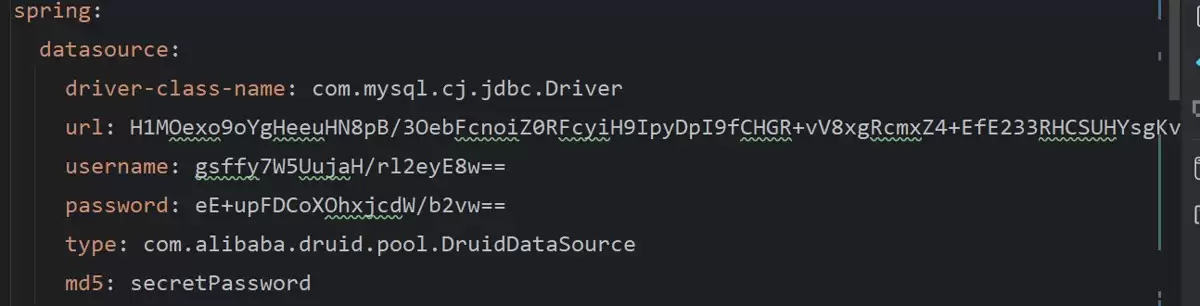
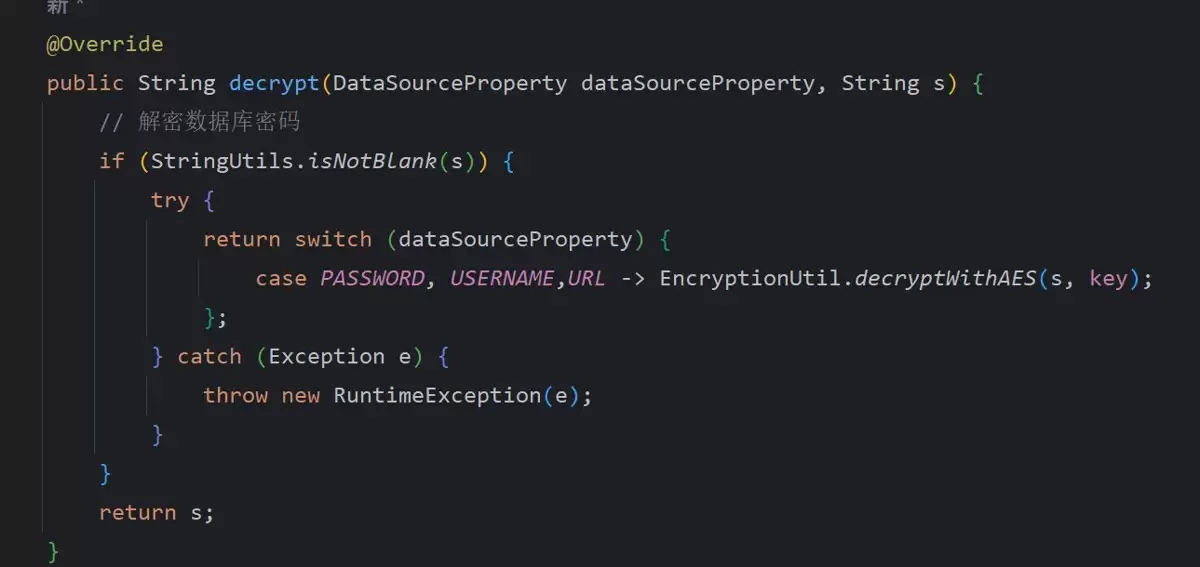
3. 实现DataSourceDecipher接口重写decrypt方法
三、总结
数据库连接信息加密是 Spring Boot 项目安全防护的重要环节。MyBatis-Flex自带这个方法,其他框架推荐优先使用 Jasypt,它能以最低的成本实现加密;若项目有特殊加密需求(如国密算法),则可选择自定义加密方案。
相关文章
-
韩剧再婚皇后阿里云盘全集高清1080P资源链接-韩剧再婚皇后免费阿里云盘资源下载4K高清无删减版链接
游戏攻略 2026-11-06
-
poipiku网站如何打开-poipiku官网网页版访问入口
游戏攻略 2026-11-06
-
明日方舟:终末地-云游戏畅玩入口-明日方舟:终末地-网页版在线直连地址
游戏攻略 2026-11-06
-
poki在线小游戏网页版-poki免费游戏大全入口
游戏攻略 2026-11-06
-
poki游戏入口-点开即玩-poki游戏-在线免费畅玩
游戏攻略 2026-11-06
-
原神akt大佬资源viciNeko入口链接-原神akt大佬资源网页vicineko入口链接分享
游戏攻略 2026-11-06








