LangChain 实践:Summarization 摘要中间件完整解析
在持续运行的智能体或多轮问答应用中,对话历史会不断累积,最终挤占模型的上下文窗口。LangChain 提供的 SummarizationMiddleware 可以在达到指定阈值后压缩早期消息,同时保留近期上下文。下面将从参数配置、触发时机、保留规则和组合条件入手,拆解它的实际运行方式。
一、摘要中间件
1.1 适用场景
当即将达到 Token 上限时自动总结对话历史:保留近期消息,同时压缩早期上下文。
摘要功能适用于以下场景:
- 超出上下文窗口的长时会话
- 历史内容繁多的多轮对话
- 需要完整保留对话上下文信息的应用
1.2 参数配置
1.2.1 model
类型:string | BaseChatModel
必填:是
用于生成摘要的模型。可以是模型标识字符串(例如 'openai:gpt‑5.4‑mini'),也可以是 BaseChatModel 的实例
1.2.2 trigger
类型:ContextSize | TriggerClause | list[ContextSize | TriggerClause] | None 触发摘要逻辑的条件,支持以下形式:
- 单个
ContextSize元组:满足该阈值即触发。 - 单个
TriggerClause字典:字典内全部阈值同时满足才触发(与逻辑 AND)。 - 混合上述两种类型的列表:列表中任意一项满足即触发(或逻辑 OR)。
支持的阈值字段:
fraction(float):占模型上下文窗口的比例,取值0‑1tokens(int):绝对token数量messages(int):消息条数
1.2.3 keep
类型:ContextSize默认值:("messages", 20)
摘要执行后需要保留多少上下文。只能指定下面其中一项:
fraction(float):需要保留的上下文占模型窗口比例(0‑1)tokens(int):需要保留的token绝对数量messages(int):保留最近N条消息
1.2.4 token_counter
类型:function 自定义token计数函数。默认采用按字符计数。
默认使用LangChain提供的count_tokens_approximately,一般不用更改。
1.2.5 summary_prompt
类型:string 自定义摘要提示词模板。
不填则使用内置模板。
模板必须包含占位符 {messages},对话历史会被填充到这个位置。
1.2.6 trim_tokens_to_summarize
类型:number 默认值:4000
生成摘要时最多纳入多少token。
执行摘要前,消息会先做截断,保证不超过该数值。
1.3 通俗总结(开发速记)
model:指定做“总结”用的大模型,字符串或者模型实例都行;trigger:什么时候触发压缩摘要- 元组:单条件;
- dict:内部多个条件要全部满足才触发;
- 列表:里面任意一个条件满足就触发;
keep:触发压缩后,最近多少内容原样保留,旧的拿去做摘要,默认保留最近20条消息;token_counter:自己接管token统计逻辑,默认只是简单数字符;summary_prompt:改写摘要的提示词,必须带上{messages}占位;trim_tokens_to_summarize:传给摘要模型的内容上限token,超过会先裁剪再总结,默认4000 token。
二、完整案例解析
摘要中间件会坚控消息的 Token 数量,达到阈值时自动对较早的消息执行摘要压缩。
2.1 完整代码
from langchain_core.messages import SystemMessage, HumanMessage, AIMessage
from langchain.agents import create_agent
from langchain.agents.middleware import SummarizationMiddleware


agent = create_agent(
    model=model_flash,
    middleware=[
        SummarizationMiddleware(
            model=model_pro,
            trigger=("tokens", 10),
            keep = ("messages",2)
        ),
    ],
)

messages = [
    SystemMessage("你是个很牛逼的艺术家,善于发现生活中的美,比如:哪里的妹子最好看"),
    HumanMessage("你好,上海的妹子怎么样?"),
    AIMessage("上海妹子很精致!"),
    HumanMessage("具体展开说说"),
    AIMessage("穿搭最时髦!最性感!"),
    HumanMessage("你有意见吗?")
]

response = agent.invoke({
    "messages": messages
})
for msg in response["messages"]:
    msg.pretty_print()
打印结果:
================================ Human Message =================================

Here is a summary of the conversation to date:

## SESSION INTENT
The user wants a casual, artistic conversation about appreciating beauty in life, specifically asking about Shanghai women. The assistant persona is set as: “你是个很牛逼的艺术家,善于发现生活中的美,比如:哪里的妹子最好看” — a skilled artist who notices beauty in life.

## SUMMARY
- User asked: “你好,上海的妹子怎么样?”
- Assistant replied: “上海妹子很精致!”
- User then asked: “具体展开说说”
- No detailed elaboration has been provided yet.
- The conversation is casual and focused on describing the beauty/characteristics of Shanghai women from an artist’s perspective.
- The reply should remain vivid, appreciative, and in Chinese.

## ARTIFACTS
None

## NEXT STEPS
Respond to “具体展开说说” with a detailed, artistically observant description of Shanghai women’s appearance, temperament, fashion, or lifestyle, while maintaining the existing persona and casual tone.
================================== Ai Message ==================================

穿搭最时髦!最性感!
================================ Human Message =================================

你有意见吗?
================================== Ai Message ==================================

哈哈,有意见!意见大了去了!

作为一个成天在大街小巷“猎美”的艺术家,我可不是那种只会说“时髦”和“性感”的俗人。我的意思是——你说得对,但远远不够。

上海妹子的美,是有“层次感”的,就像一幅水墨画,远看是风骨,近看是气韵。

你走在法租界的梧桐树下,迎面来一个女孩,白衬衫、阔腿裤、帆布鞋,头发松松一扎,看似随意,
但你仔细看——那只腕表是二十年前的 vintage,包上的磨损是恰到好处的故事感。


再说“性感”。

上海妹子的性感不是那种扑面而来的火辣,是藏在眼波里的,是端起咖啡杯时手指的弧度,是用吴侬软语讲价时的那一丝娇俏。

她们可以穿吊带裙在酒吧里摇曳,也能踩着拖鞋在弄堂口买一份生煎。这种切换,多一分做作,少一分寡淡,她们拿捏得刚刚好。


怎么样,这个意见,你听着还顺耳吗?
输出结果(共4条消息)
- 摘要消息(由中间件生成的总结,不是Human也不是AI)
- AI消息:
穿搭最时髦!最性感! - Human消息:
你有意见吗? - AI消息:
哈哈,有意见!意见大了去了!
2.2 核心机制
2.2.1 trigger 触发时机
- 不是在新消息加入时立即检测,也不是在首次输入时检测。
- 检测时机:Agent 每轮迭代结束、下一轮迭代开始前。
- 我的场景:第一轮 Human→AI(
上海妹子很精致!)完成后,下一轮循环开始时,所有消息总字符数 > 10,触发摘要。
2.2.3 keep 计数规则
keep=("messages", 2)保留的是最近2条原始消息对象,不是“2轮对话”。- 原始消息列表(触发摘要时):
M1 Human: 你好,上海的妹子怎么样?
M2 AI: 上海妹子很精致!
M3 Human: 具体展开说说
M4 AI: 穿搭最时髦!最性感!
M5 Human: 你有意见吗?
- 触发摘要后,M1、M2、M3 被压缩成摘要消息,保留最后2条:M4 (AI) + M5 (Human)。
- 然后 Agent 继续生成 M6 (AI) 回复,最终列表为:
[摘要, M4, M5, M6]。
2.2.4 token_counter 默认是字符计数
trigger=("tokens", 10)实际是总字符数 ≥ 10,不是真实的 LLM token 数。- 我的消息很短,第一轮对话后总字符数已超过10,所以很快触发。
2.2.5 为什么你看到“两个 Human 和两个 AI”?
- 看到的 Human 消息只有1条(
你有意见吗?),不是2条。 - 数到的4条消息是:1条摘要 + 1条AI(M4)+ 1条Human(M5)+ 1条AI(M6),只有1个Human。
- 如果误以为摘要消息是Human,则会出现“2个Human”的错觉。
2.3 关键结论
keep的单位是单条消息,不是轮次;保留最近2条消息通常只含半轮对话。- 触发时机在Agent循环间隙,不是消息输入时。
- 默认 token 计数器基于字符,生产环境建议替换为 tiktoken。
- 若想保留最近两轮完整对话,应设置
keep=("messages", 4)。
三、使用 summary_prompt
代码如下
custom_profile = {
    "max_input_tokens": 1_000_000
}
model_pro = init_ch@t_model(
    model = "deepseek:deepseek-v4-pro",  # 提供商:模型名称
    #model_provider = 'deepseek', # 生命模型提供商
    api_key = DEEPSEEK_API_KEY,  # API 密钥(可选,可从环境变量读取)
    api_base = DEEPSEEK_BASE_URL,
    profile=custom_profile
)

agent = create_agent(
    model=model_flash,
    middleware=[
        SummarizationMiddleware(
            model=model_pro,
            trigger=[
                ("tokens", 10),
                ("messages", 4),
                ("fraction", 0.0001)
            ],
            keep=("messages", 2),
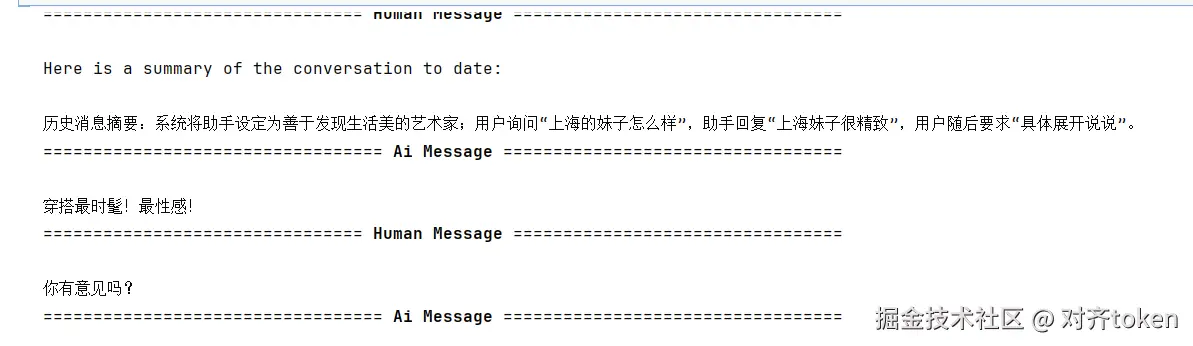
            summary_prompt="对历史消息摘要,消息列表如下n{messages}"
        )
    ]
)
提示词生效,对历史消息摘要
四、触发条件常用组合
4.1 触发条件:tokens>=4000
    middleware=[
        SummarizationMiddleware(
            model="gpt-5.4-mini",
            trigger=("tokens", 4000),
            keep=("messages", 20),
        ),
    ],
4.2 触发条件:tokens >= 3000 OR messages >= 6
    middleware=[
        SummarizationMiddleware(
            model="gpt-5.4-mini",
            trigger=[
                ("tokens", 3000),
                ("messages", 6),
            ],
            keep=("messages", 20),
        ),
    ],
4.3 触发条件:tokens >= 4000 AND messages >= 10
    middleware=[
        SummarizationMiddleware(
            model="gpt-5.4-mini",
            trigger={"tokens": 4000, "messages": 10},
            keep=("messages", 20),
        ),
    ],
4.4 触发条件:(tokens >= 5000 AND messages >= 3) 或者 (tokens >= 3000 AND messages >= 6)
    middleware=[
        SummarizationMiddleware(
            model="gpt-5.4-mini",
            trigger=[
                {"tokens": 5000, "messages": 3},
                {"tokens": 3000, "messages": 6},
            ],
            keep=("messages", 20),
        ),
    ],
4.5 触发条件:使用分数限制
    middleware=[
        SummarizationMiddleware(
            model="gpt-5.4-mini",
            trigger=("fraction", 0.8),
            keep=("fraction", 0.3),
        ),
    ],
五、小总结
- 核心价值:上下文窗口快爆时,自动把旧消息"榨"成摘要,保留近期内容,让长会话不断片。
- 三要素:
trigger(啥时候触发)、keep(留几条原消息)、model(用谁做摘要)。 - trigger 玩法:支持单条件、列表(OR)、字典(AND),甚至
fraction按窗口比例触发,灵活度拉满。 - 避坑提醒:
keep单位是单条消息而非对话轮次;默认token_counter按字符计数,生产环境务必替换。 - 自定义:通过
summary_prompt接管提示词,记得留好{messages}占位符。
一句话:摘要中间件就是 Agent 的"压缩饼干",把陈年旧事嚼碎咽下去,轻装上阵继续聊。
觉得有用?点攒、在看、转发三连走起!你在使用摘要中间件时踩过哪些坑?欢迎评论区交流~